Karsten Lehmann 21 August 2026 09:00:00
Two kinds of sharing turn up in every organisation, and MindooDB has only been graceful about one of them.
The easy one is the department key. Everyone in HR holds one key, everything confidential for HR is locked with it, and people receive or stop receiving that key as they join and leave. The audience is a role. It stays stable for years, and an administrator sets it up once.
The other one is this document, for these people. A contract only legal and the two signatories should open. A sketch that should stay between you and a colleague. Notes that follow you from laptop to phone and stay unreadable to the tenant administrator, even though that administrator runs the workspace. Those audiences are not departments. They are names, and names change.
That second kind was always possible too - by minting an encryption key yourself and passing it around by hand, or by asking an administrator to set up a key-distribution policy. Both work, and I will come back to what each of them costs. Neither is something you want to go through to share one document with two colleagues. So MindooDB and Haven now give every person a user key instead: one key that belongs to you, not to a particular laptop and not to a team. Encrypt for Alice, and Alice can open the result on every device she has approved - today, and after she has replaced all of them.
What we could already encrypt
From day one, MindooDB has encrypted every document so the server that stores and syncs it never sees anything but ciphertext. Who may read a document is decided by who holds the right shared key - a default key for everyone in a tenant, or a named key for a department or a project.
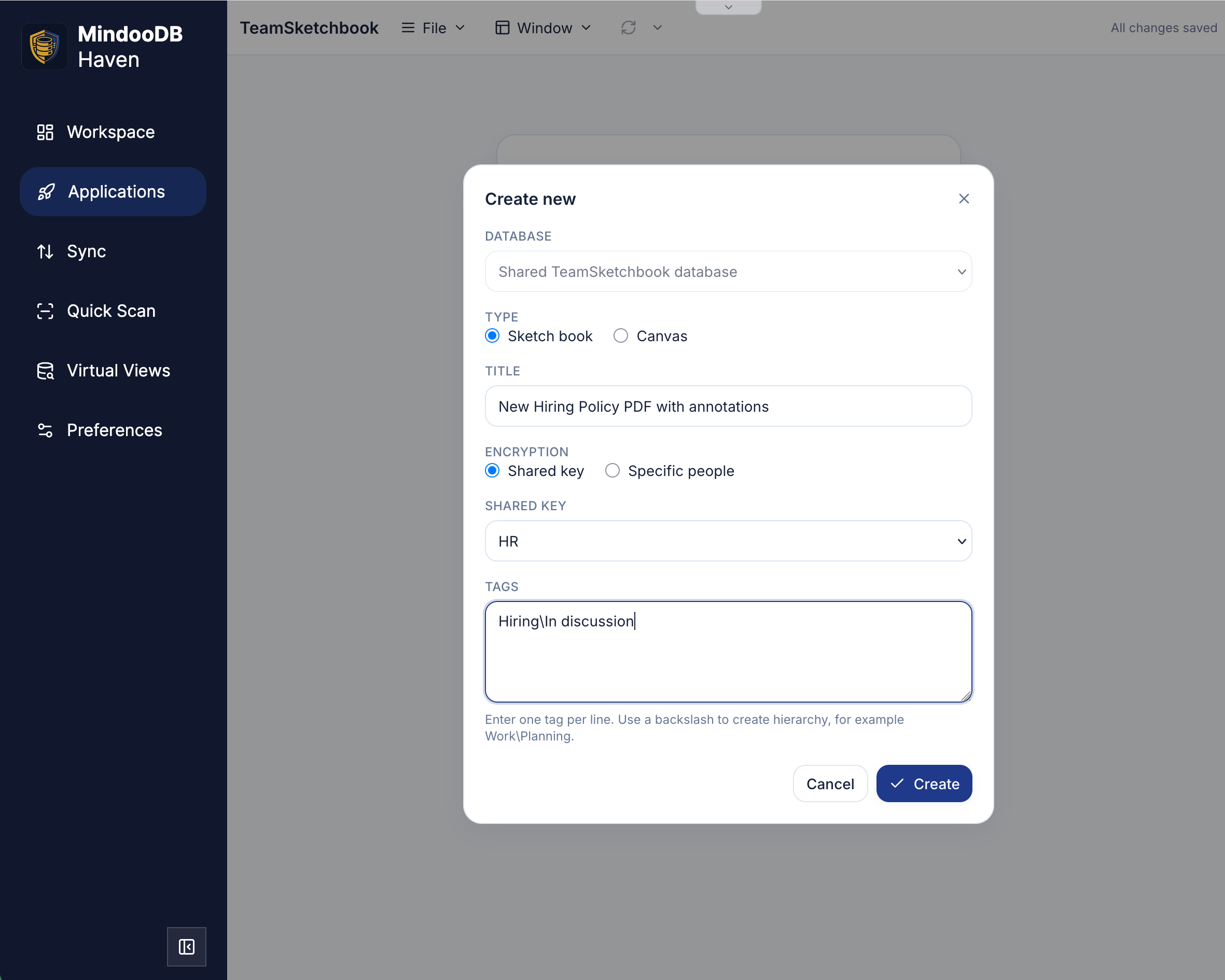
In TeamSketchbook that is a choice you make while creating the document. Below, a sketch book holding an imported policy PDF is locked with the HR key, so the whole team can add hand-written annotations to the concept and see each other’s notes - and nobody outside HR can open it.
Getting those keys to the right people was already designed to keep the administrator blind. You could mint one in the KeyBag and hand it over directly, password-protected, to the people and devices that should hold it: simple, but with no take-back, because once a copy has left your hands the only way to undo it is to re-encrypt everything under a new key. Or you could use a key-distribution policy, where someone who already holds the key seals a copy for each recipient and the administrator’s system carries those sealed copies along with the regular sync - able to stop issuing them when access should end, never able to look inside. I wrote about that admin-blind distribution in July. It can revoke, but it needs an administrator, and under the hood it used to be aimed at devices, so every new phone meant rewriting who gets what.
A key that belongs to a person
A user key is a key pair that belongs to one human being. The public half is published inside the tenant, so anyone who should encrypt for Alice can do so without asking her first. The private half exists only on the devices she has explicitly approved - and it is an already-approved device of hers that lets the next one in, not the administrator. An administrator can add a device to her account, because that is their job, but that does not hand them her user key.
Those personal keys live in a dedicated database called userdirectory, which syncs automatically between clients and servers, just as the tenant directory already does - the directory being the place where only the administrator may write. Splitting the two is the point: the administrator still runs membership, and still cannot reach the material that unlocks a person’s data. The people who operate the infrastructure carry sealed envelopes. They do not get to open them.
User keys also quietly fix the shared keys you already use. Key-distribution policies now deliver those keys to user keys rather than to a changing list of devices. Approve a new laptop, and the keys you were already entitled to arrive with you. Nobody rewrites the policy.
A document for a list of names
When you share a document with a recipient list, MindooDB generates a fresh key for that document and prepares a copy of it for each person on the list - a copy only they can open, with their user key. The body is locked with that key, and so are its attachments. Nobody else in the tenant can read it: not the administrator, not the server, and not colleagues who hold a department key for other records.
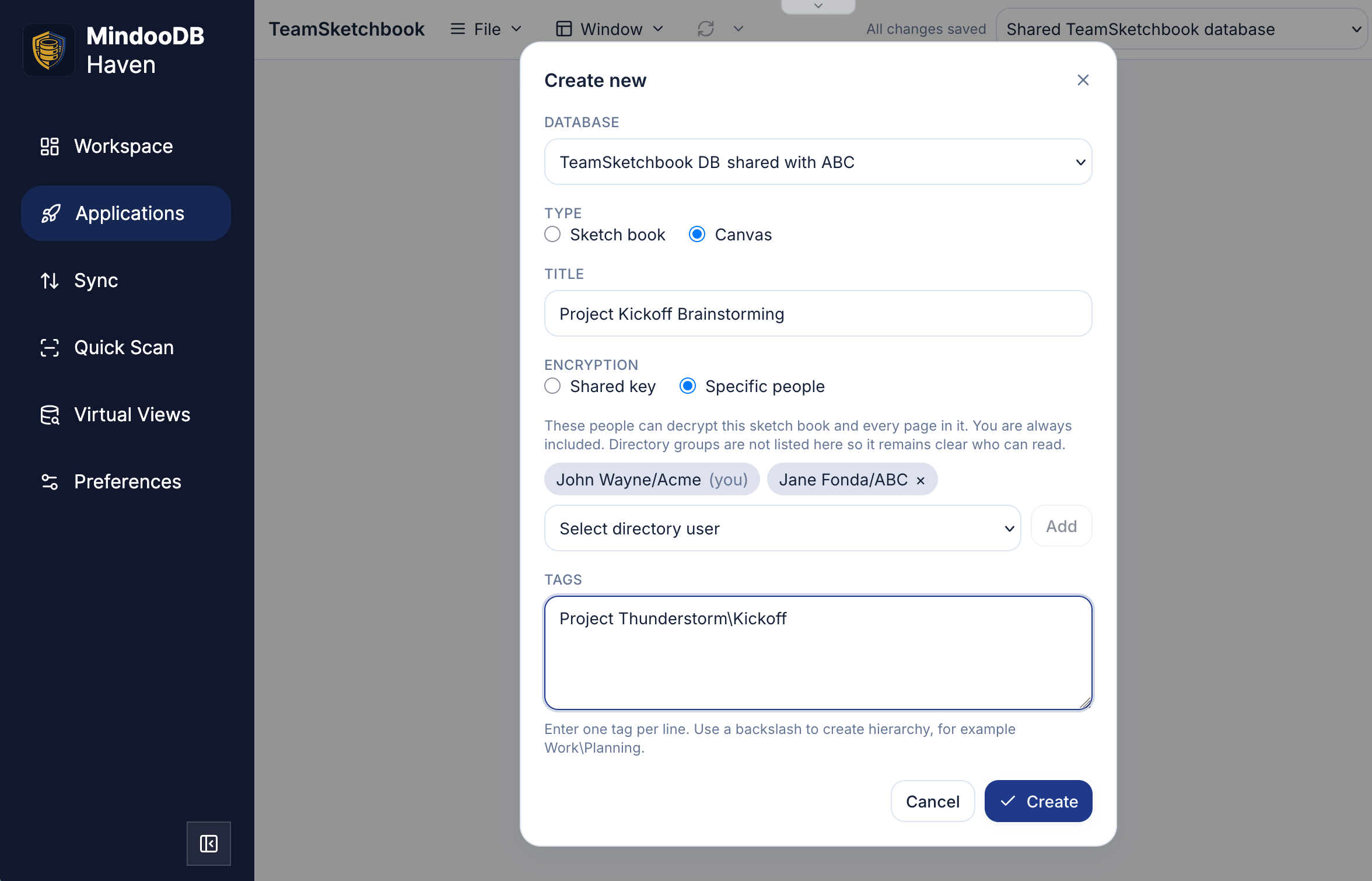
It is the same dialog as before, with the encryption switched over. This canvas belongs to a joint project between two companies, each with their own private tenant, keeping the shared project data in a tenant both of them reach - and the recipient list names the handful of people actually on the project, on both sides. They can brainstorm together during a video call or offline on a train, and the strokes merge on the next sync.
Taking someone off the list is the other half of the promise. MindooDB rotates the document key automatically and prepares it again for everyone who remains, so the removed person cannot unlock anything new, and on their next sync the document disappears from their workspace altogether (no longer accessible, and gone from virtual views too). Adding a person works in the other direction: they can read the document and its history, without anyone minting a new key for the organisation. (A device that never comes back online still holds whatever it cached. For a lost laptop, that is what remote wipe is for.)
The smallest useful list is one name: your own. Drafts, personal settings, a backup only you should be able to restore - encrypt them for yourself and they follow you onto every device you approve, and onto nobody else’s.
And it need not sit inside your employer’s workspace at all. Your own private tenant works exactly the same way - whether the audience is only you, or a colleague you want to hand something to directly - and virtual views pull your private, work and shared-project data into a single list, straight across those boundaries.
The two styles are meant to live together. Use a shared key when the answer to “who may read this?” is a role. Use a recipient list when it is a handful of names, or just you.
Already in the apps you use
Both screenshots above are Mindoo TeamSketchbook, but none of this is app-specific. Mindoo TeamEdit - collaborative editing of Markdown and Word files - offers the same choice when you create a document, and in both apps the recipient list stays editable afterwards, in the document’s properties. If you are building your own Haven app, it is available on every MindooDB document, and the full technical description is in the user keys documentation on GitHub.
End-to-end encryption is easy to promise at the database level and hard to make usable at the document level. That is the gap user keys close - this contract, those three names, and the right to take a name off the list again, without minting a key yourself, without filing a ticket, and without giving the administrator or the server a look at the contents.
Haven Community remains free to use for private and commercial projects at haven.mindoodb.com. Everything MindooDB and Haven is at mindoodb.com.