Karsten Lehmann 22 August 2026 10:00:00
A question came up the other day in a chat with my fellow CEO Tammo Riedinger: what is the smallest thing you can run a MindooDB server on?
It is not an idle question. A lot of the people we talk to want a server that lives in their own building - a doctor’s practice, a school, a small engineering firm - and for them “your own server” should mean a fanless box on a shelf, not a rack.
That wish has a name these days. Digital sovereignty has moved from a niche concern to something discussed at board level: running your applications on hardware you own, in a jurisdiction you chose, rather than in one of the large clouds - most of them operated by US corporations and subject to legislation you have no vote in. For a lot of organisations the honest answer to “where is our data?” ought to be “in that cupboard downstairs”. Which only works if the server fits in the cupboard.
So we sat down with ChatGPT and put together a shopping list of mini PCs and Raspberry-Pi-class boards to try. That hardware is still in the post.
While waiting, I got impatient and tried the least sensible machine in the building. It was already in my pocket.
Why the bar is so low
The reason this is even worth attempting is what a MindooDB server actually does, which is much less than a database server normally does.
It never decrypts anything. Documents arrive as encrypted entries, get appended to a content-addressed store, and get handed out again to whoever is entitled to sync them. The server stamps each entry with a signed witness receipt - proof of when it arrived, from a clock nobody in the tenant controls - and that is about the extent of its cryptographic work at runtime.
It does keep indexes, but only over the envelope: which entry belongs to which document, the order in which entries arrived, what depends on what. That is what lets a client say “give me everything since here” and get an answer straight away instead of the server rummaging through the whole store. They are cheap to maintain - a few map updates as each entry lands - and they are built purely from the signed metadata on the outside of the envelope, which was never secret in the first place. Indexing the contents - full-text search, queries, virtual views - happens on the clients instead, because they hold the keys and are the only parties that can see what a document actually says. That does not call for powerful client hardware either: the work is incremental, done on your own data as it arrives, and MindooDB runs as an installable PWA in an ordinary browser tab on phones, tablets and desktops.
So the server is, in the nicest possible sense, a well-organised postbox. What it needs is a Node.js runtime, enough disk for the data, and a network connection. That is the whole list.
The least sensible machine in the building
UTM SE runs virtual machines on iOS. On Apple’s own chips that could be quick, but Apple does not permit JIT compilation in App Store apps, so UTM SE has to interpret guest instructions rather than translate them once and reuse them. Everything runs, and everything runs slowly.
The first attempt was an ARM64 Ubuntu image, matching the phone’s actual architecture. It refused to get through the installer. Rather than debug it, I went in the other direction entirely and installed Debian as emulated x86_64 - so now an ARM phone was pretending to be an Intel machine, one instruction at a time, with no JIT to soften it. I gave the VM 2 GB of RAM and 7 GB of disk.
From there it behaved like any other Debian box, just a patient one. I installed an OpenSSH server, and from that point on the phone was simply a host on the LAN: SSH in from the laptop, install git, clone MindooDB from GitHub. A server in my pocket, being administered over the network, which is a slightly strange feeling.
Strictly speaking a Node.js runtime would have been enough. But our serversetup.sh currently assumes Docker, and I wanted to run the normal setup rather than spend time on a new setup script. Besides, whether the whole Docker build would survive the phone was by far the more entertaining question. So: Docker, inside an emulated x86_64 VM, inside an app, on a phone.
What emulation costs, in numbers
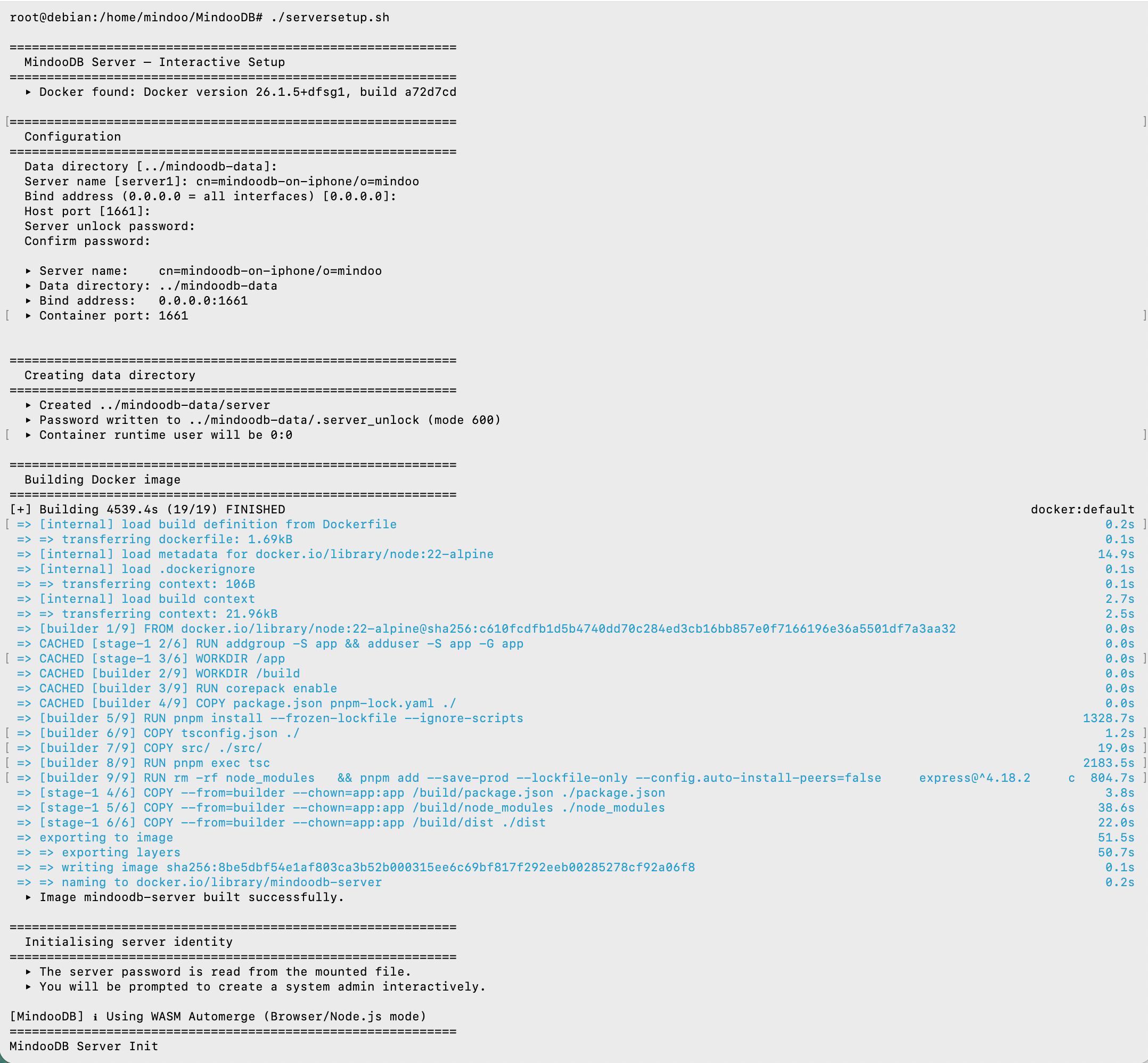
Docker reports its own build time, and it is a good one: 4539.4 seconds - one hour and fifteen minutes for nineteen build steps. Installing the dependencies accounted for 22 minutes of that and compiling the TypeScript for 36 minutes, a job that takes a few minutes on a laptop.
Then the setup script generates the server’s identity, and that log makes the emulation penalty even more concrete:
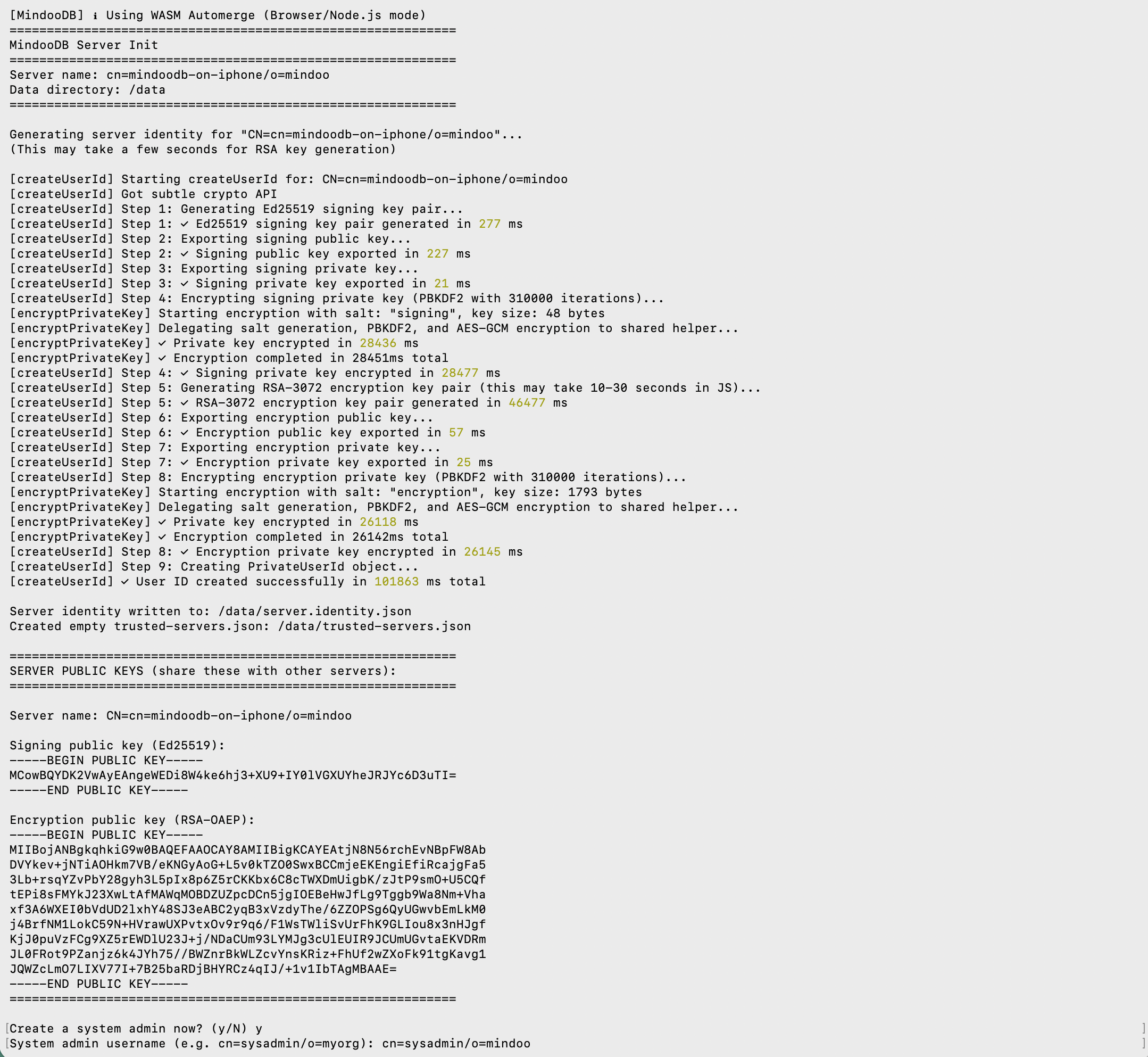
The Ed25519 signing keypair took 277 milliseconds. The RSA-3072 encryption keypair took 46 seconds. Encrypting each private key at rest - PBKDF2 with 310,000 iterations, deliberately expensive so a stolen identity file is not worth attacking - took roughly half a minute apiece. All in, 102 seconds to create one identity that a normal machine produces in about a second.
That is a fair measure of how slow interpreted x86_64 on an ARM phone really is: somewhere around two orders of magnitude. And it is entirely the setup that suffers. Key generation and image building are one-off costs; relaying encrypted entries afterwards is cheap, which is exactly why the thing is usable at all once it is up.
And then it ran
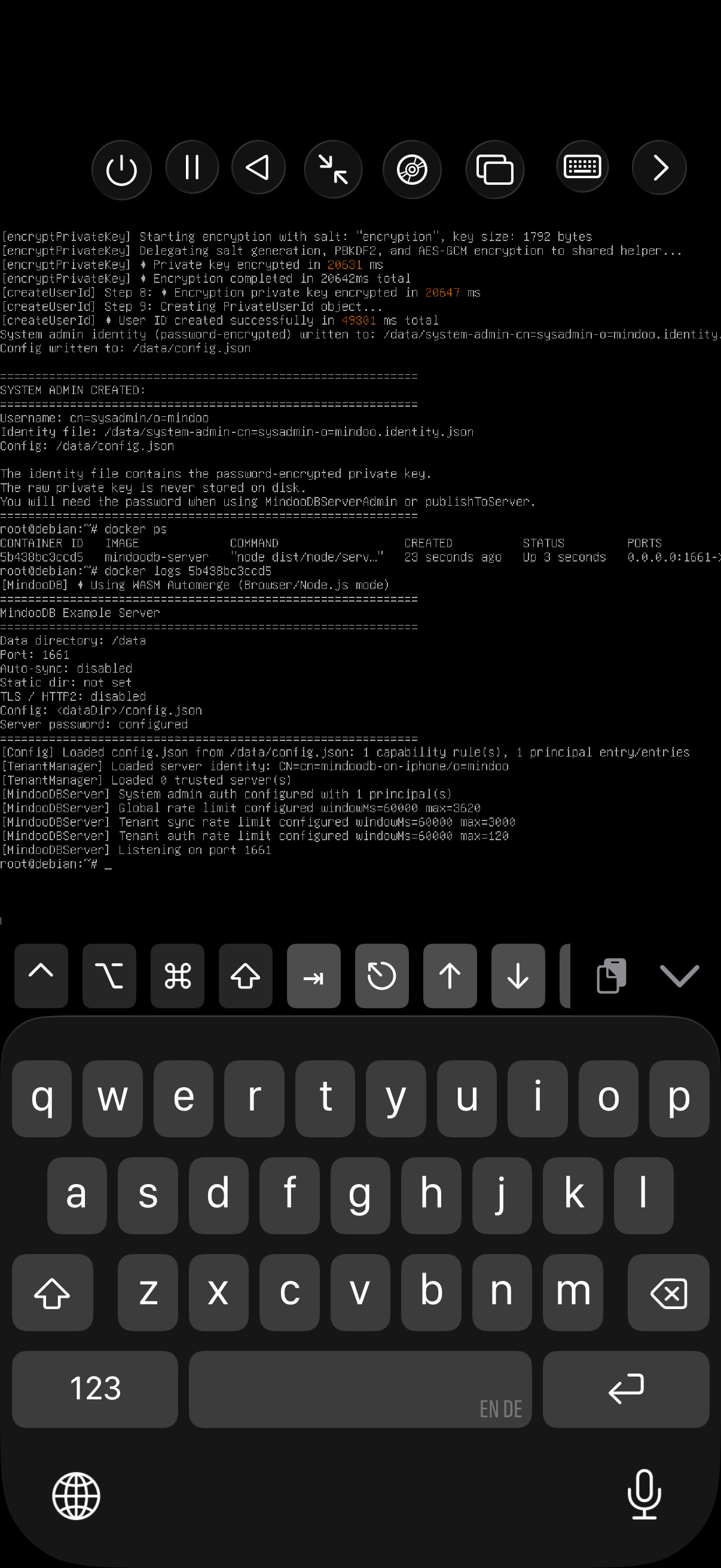
docker ps shows the container up, port 1661 published, and the server reporting for duty: data directory mounted, config loaded, one system-admin principal, rate limits in place, zero trusted servers because this one has no peers. A complete, correctly configured MindooDB server - listening on a phone.
What this does and does not prove
It does not prove you should do this. Please do not do this.
What it does show is where the floor is. If a MindooDB server survives being run through an instruction-by-instruction emulator on battery power, then the boxes actually meant for the job - a mini PC, a Raspberry Pi, a NAS, the laptop that was replaced two years ago and still works fine - have a great deal of headroom. Running your own server should not require buying server hardware, and for MindooDB it does not.
Cheap servers also make more interesting shapes possible, because MindooDB servers can mirror each other one-to-one in a cluster. The obvious use is redundancy: a second machine holding the same data, ready to take over. The more interesting one is the temporarily isolated island. Put a small server on a ship or an oil rig, and the crew works against it from tablets at full speed, with no dependence on a satellite link that may or may not be there; that server reconciles with the one on the mainland whenever a connection returns. Since servers sync with each other rather than through a central authority, being cut off is not a degraded mode - the island is simply a node that happens to be offline for a while, which is the same thing MindooDB already assumes about your laptop on a train.
It is worth being clear about what “MindooDB on a phone” normally means, too, because it is not this. The client side has run properly on phones for a while: we have used the MindooDB client inside React Native apps, compiled for the platform, with local storage and sync and no emulation anywhere in sight. That is the sane way to have MindooDB on a phone. This was the other way.
The mini PCs should arrive shortly and I will write up how they do. If you have a favourite piece of unlikely hardware you think should be on the list, I would genuinely like to hear about it - the more awkward, the better.
MindooDB is open source under the Apache 2.0 licence, and Haven Community is free for private and commercial projects at haven.mindoodb.com. Everything else is at mindoodb.com.