Karsten Lehmann 17 May 2026 15:30:00
Today we published the next sample application for MindooDB Haven: Mindoo TeamGrid, a collaborative spreadsheet editor, available as Open Source.
Two people open the same workbook. One sits on a train, no network, inserts three new rows above the totals and types a fresh =SUM(...). The other is at the office, online, deletes a column from a different worksheet and reformats a header row. A third tab of the same user runs TeamGrid embedded inside the Haven workspace, while a fourth opens it in standalone mode on a phone. Hours later everyone syncs back. TeamGrid catches up, merges the four streams of edits, and shows everybody the same consistent workbook — with every formula still pointing at the cell the author meant, not at whatever address that cell happens to have after the merge.
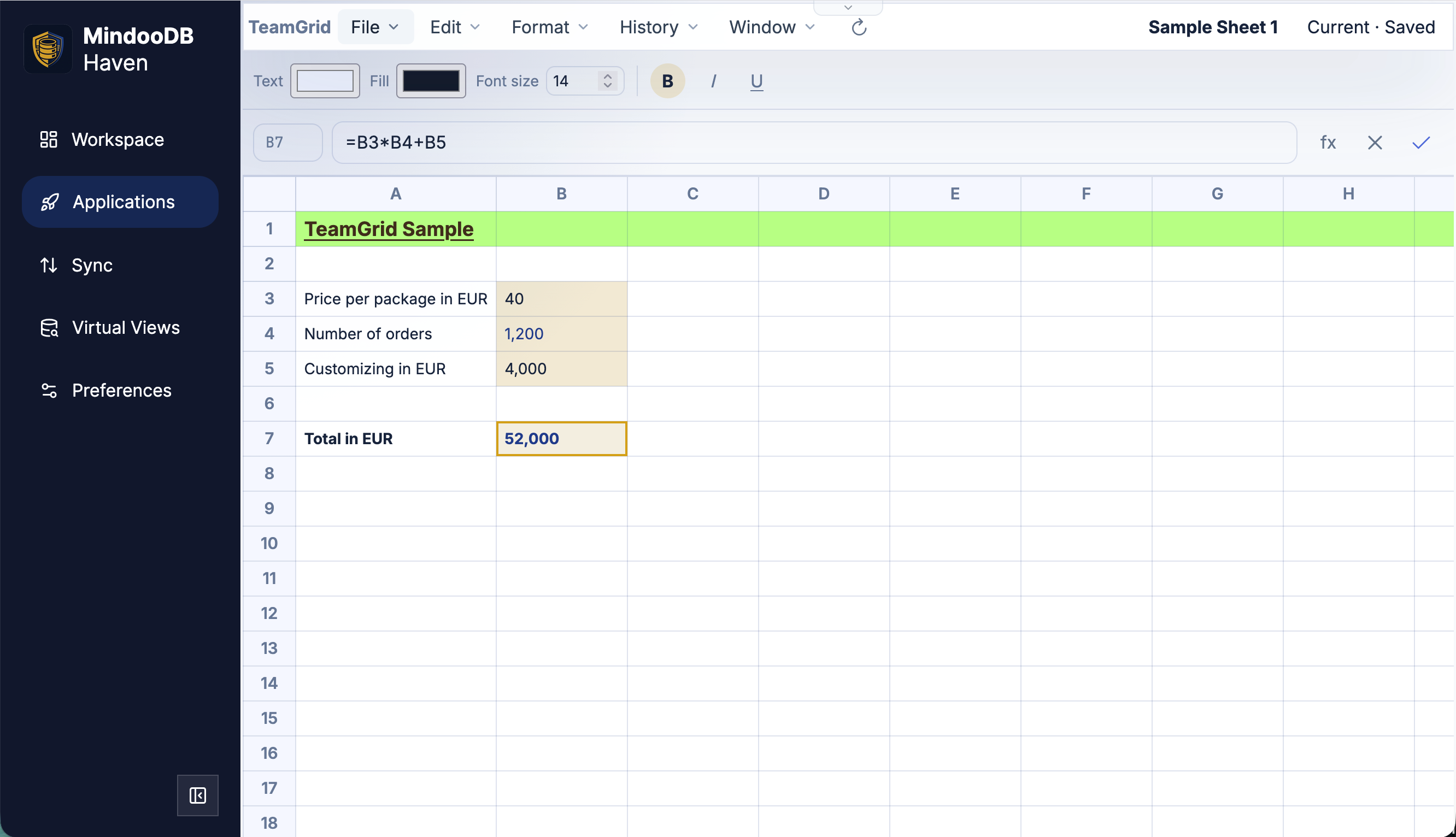
Getting that right is harder than it looks for spreadsheets. The Excel mental model is built around grid coordinates: a formula in D7 adds up D1:D6 by position. As soon as two users insert rows or columns concurrently — or the same user does so on two devices that haven’t seen each other’s changes yet — the position-based references silently shift, and the formula that used to total a column now totals something else. MindooDB’s promise is that anyone can edit anywhere, online or offline, on any device, and that merge results are deterministic. A spreadsheet that lets formulas race the grid violates that promise on the very first row insertion.
So the data model in TeamGrid does not store A1 and D7. Each worksheet has an ordered list of stable row IDs and column IDs, each cell is keyed by rowId:columnId, and every formula persists its references as stable IDs as well. The visible A1 notation in the formula bar and the UI is a projection — we recompute it on every render from the current row and column order. Inserting a row anywhere in the worksheet appends a new stable ID to the order list; existing IDs do not move; existing formulas do not need to be rewritten. Rows, columns, and worksheet tabs are also never hard-deleted — they are tombstoned. That keeps history explainable and lets a formula that points at a removed column render a clean #REF! rather than quietly retargeting a different column.
To make Automerge actually merge these edits the way we want them to merge, we extended the MindooDB App SDK with a granular JSON patch API. Apps still never see Automerge directly — they describe edits to Haven as small set, unset, listInsert, and listDelete operations against specific JSON paths, together with the baseHeads of the document version they were authored against. Haven applies and merges the patch against the real Automerge document on its side. The effect for TeamGrid: two users typing into different cells produce patches that touch disjoint stable-ID paths, so the merge is automatic and lossless; two users inserting rows produce list inserts authored against the same baseHeads, so the row order list interleaves cleanly instead of last-writer-wins; and a user who saved their changes while four other unmerged sync heads still exist in MindooDB sees the canonical merged workbook the moment Haven hands the document back. The same machinery makes the same user safe across devices — embedded in Haven vs. standalone, desktop vs. phone — because every save carries the heads it was authored against and merges itself in.
A short tour of what TeamGrid currently does:
- Workbooks with multiple worksheet tabs, plus rename, reorder, and (tombstoned) delete.
- Cell values for strings, numbers, and dates, with simple display formats — integer, decimal, currency, percent, date, date+time, time.
- Cell styles: text and background color, font family and size, bold, italic, underline, horizontal and vertical alignment, configurable row heights and column widths.
- Formulas with arithmetic (
+,-,*,/), cell and range references, and the functionsSUM,AVERAGE,MIN,MAX,COUNT,CONCAT, andTODAY. A dependency graph drives invalidation, and a content-assist panel offers function signatures, inline help, and live highlighting of referenced cells and ranges while you author a formula. - Excel import and export. File mode uses the .xlsx format and round-trips values, formulas (where supported), number and date formats, fonts, fills, and alignment. Clipboard mode copy/pastes ranges through the OS clipboard with three parallel encodings — a TeamGrid-native JSON payload for lossless TeamGrid-to-TeamGrid paste, an Excel-compatible HTML body with
x:fmlametadata so Excel keeps relative formulas, and a plain TSV fallback for everything else. - Full Haven integration: capability-gated File/New/Open/Save/Delete, multiple open spreadsheets per session, host-driven light and dark themes, time travel, and a read-only revision picker that opens any earlier version of a workbook in the same editor.
We are deliberately upfront about scope: TeamGrid’s formula engine is permissive-license sample code, not an Excel-compatible spreadsheet engine. It supports a small, well-chosen subset of Excel’s functionality — enough to show how a real-world collaborative spreadsheet plugs into MindooDB, not enough to replace Excel. In parallel we are actively exploring more advanced editors, both open source and commercial, to edit Office formats in a data-sovereign way with full concurrency support, but most packages we evaluated are not yet powerful enough to fit our requirements (in particular: a clean separation between presentation and a stable-ID data model, and being able to drive edits through granular CRDT-friendly operations rather than whole-document replacements). TeamGrid exists in the meantime as a clear, hackable starting point — and as a working proof that the MindooDB collaboration model carries over from text documents to structured grids.
We also intend to keep growing TeamGrid itself over time. Stable-ID storage, the granular JSON patch save path, and the dependency-tracked formula engine were built so new features — additional functions, named ranges in the UI, conditional formatting, charts, virtualized large sheets, richer Excel round-tripping, and more — can be layered on without touching the core collaboration model. We’ll ship those incrementally as they get useful, and contributions on the GitHub repo are welcome.
TeamGrid is available on the Applications page of Haven as an example preset; one click registers the app, picks a database for it, and opens an empty workbook. The source code is on GitHub and doubles as a tutorial for building document-style Haven apps that need granular structured editing:
https://github.com/klehmann/mindoodb-app-teamgrid
The granular JSON patch surface (set, unset, listInsert, listDelete, plus baseHeads) is part of the open source MindooDB App SDK. It sits alongside the text edit API we shipped with Mindoo TeamEdit, the granular collaborative markdown editor, and the same shape will keep showing up in future Haven apps wherever we need structured concurrent editing without a full Automerge runtime in the app bundle. More details are in the SDK README.