Karsten Lehmann 24 November 2026 09:00:00
Mail, calendar and contacts are the apps people open first in the morning and close last at night. They are also where vendor lock-in hurts the most: your mail history, your appointments and your address book live with one provider, in that provider’s format, behind that provider’s login. Moving away means exporting, converting and hoping nothing gets lost.
For Haven we wanted the opposite. Over the last weeks we built mail, calendar and contacts for Haven with one rule: you choose where your mail lives, and you can change your mind later. You can:
- use Mindoo Mail, our own mail system inside your Haven tenant, end-to-end encrypted and working offline,
- connect it to Internet mail through our free, open source Mindoo Mail Gateway, on a server you run yourself or one we run for you,
- or keep your existing mailbox and connect it over IMAP/SMTP, JMAP, CalDAV/CardDAV, Microsoft 365 or HCL Domino.
All of them show up in the same app, Mindoo Mail, next to each other, and you can mix them. This post walks through how the pieces fit together.
Mindoo Mail: mail inside your tenant, out of the box
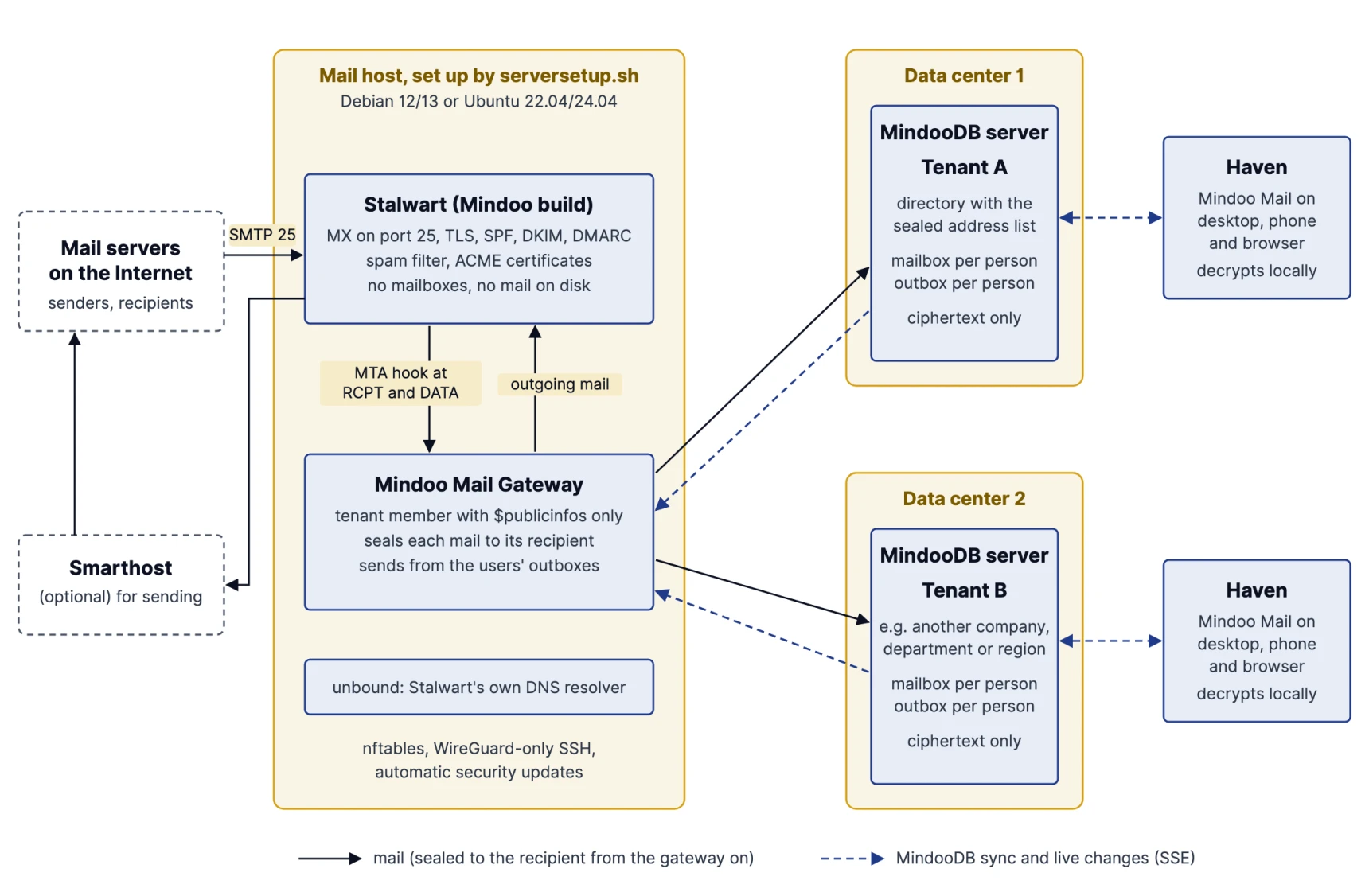
The simplest case needs no mail server at all. Everyone in a Haven tenant can write to everyone else in that tenant right away. A mail is a MindooDB document, sealed to its recipients with their user keys (the mechanism we described in Encrypt this for Alice), and placed in the recipient’s personal mailbox database. Only the recipient’s own devices can sync that mailbox, and only the recipient can open what is in it.
Because it is MindooDB underneath, this works the way the rest of Haven works:
- Offline. Write a mail on the train. It is encrypted on your device right away and leaves with the next sync.
- On every device. Your mailbox syncs to Haven Desktop, the Haven app on your phone and Haven in the browser.
- On any server. It works the same with a MindooDB server hosted by us and with one you host yourself. The server only ever stores ciphertext.
Internet mail: the Mindoo Mail Gateway
Mail between colleagues is a good start, but most mail comes from outside. For that we built the Mindoo Mail Gateway. It is free and open source under the AGPL, and it connects a Haven tenant to the rest of the world’s mail.
Why Stalwart
The gateway does not speak SMTP to the Internet itself. That job goes to a real mail server, and we chose the Stalwart Mail and Collaboration Server, also licensed under the AGPL. Stalwart is written in Rust, mature, and comes with what a mail server facing the Internet needs today: SPF, DKIM, DMARC and ARC checks, a capable spam filter, DNSBL lookups, automatic TLS certificates over ACME, and MTA-STS and TLS reporting. Just as important for us: it is open source, its MTA hooks let another program take part in every SMTP transaction, and everything we use is part of its free Community Edition.
A server set up and hardened with two scripts
Running a mail server should not require a week of reading. The gateway comes with two scripts for a fresh cloud server running Debian 12 or 13, or Ubuntu 22.04 or 24.04. We tested them on Hetzner Cloud.
serversetup.sh hardens the machine before anything else is installed. You can run it again at any time; it only changes what is not set up yet.
- WireGuard for administration. SSH listens only on the WireGuard tunnel, accepts keys only, refuses root logins and password logins, and allows a single admin user. The switch to tunnel-only SSH happens only after a login over the tunnel has been seen, with a timer that rolls it back if you lock yourself out.
- A host firewall with nftables: inbound only port 25 for mail, the WireGuard port and ICMP. The README also lists the rules for the Hetzner Cloud Firewall in front of it.
- Automatic updates: unattended-upgrades installs security updates and Docker updates daily and reboots at 04:30 when an update needs it. needrestart restarts services that still use an old library right away.
- Docker from Docker’s own repository, ready for the next step.
install.sh then asks a few questions (mail domain, DNS provider, the MindooDB server, an admin e-mail address, optionally a smarthost for sending) and does the rest:
- It sets up the DNS records for you through the API of Cloudflare or Hetzner: MX, SPF, DKIM with rotating keys, DMARC, TLS-RPT, CAA and, if you want it, MTA-STS. With any other DNS provider it prints the records, writes them to a file and checks until they are right.
- It gets certificates from Let’s Encrypt with ACME, through DNS-01 for Cloudflare and Hetzner, so neither port 80 nor 443 has to be open, or through TLS-ALPN-01 for manual DNS.
- It gives Stalwart its own DNS resolver (unbound), because spam block lists such as Spamhaus refuse queries from shared resolvers like the ones cloud providers run.
- It pulls ready-made images for amd64 and arm64, configures Stalwart through its management API, and shows the gateway’s join request for your tenant.
How mail arrives without landing on the disk
This is the part we care about most. A classic mail server accepts a message, writes it to its queue, delivers it into a mailbox on disk and keeps it there until someone fetches it. Every one of those copies is plaintext on a server, and a server full of mailboxes is a valuable target.
With the gateway, Stalwart has no mailboxes for your domain at all, and a message never reaches Stalwart’s disk:
- When a sending server names a recipient (SMTP
RCPT TO), Stalwart asks the gateway through an MTA hook whether that person exists in the tenant and has a user key. If not, the sender gets a temporary error and tries again later. - When the message itself arrives (SMTP
DATA), Stalwart runs its checks and hands the message to the gateway, still in memory. - The gateway turns it into a Mindoo Mail document, with all header lines as fields and attachments as real MindooDB attachments, seals it to the recipient and pushes it to the recipient’s mailbox on the MindooDB server.
- Only after the server has confirmed the document does the gateway tell Stalwart to drop the message, and the sender gets
250 OK. If anything fails on the way, the sender gets a temporary451and keeps the message, as SMTP intends.
Each recipient gets their own document, so a recipient never learns about the Bcc copies of others, and a retried delivery never creates a duplicate.
One detail needed a change in Stalwart itself. The headers Stalwart adds while it receives a message, such as Received, Authentication-Results and its spam score, were not part of what the hook gets to see, so a message stored this way lost exactly the information you need to judge it. We maintain a small fork, klehmann/stalwart, branch mindoo/server-headers, that adds those headers to the hook request. That is also where the AGPL source of our Stalwart images is published. With it, the gateway stores Stalwart’s spam verdict on the message, and Mindoo Mail sorts suspicious mail into the Junk folder.
And if the MindooDB server cannot be reached for a while? Then the gateway keeps the message it has already sealed and pushes it later. What waits on the gateway’s disk in that case is ciphertext that only the recipient can open, never the plaintext message.
A tenant member with almost no rights
The gateway joins your tenant the way a person does: it creates a join request, and an admin approves it in Haven. But it asks for far less than a person:
- It does not get the tenant’s default key, so it cannot read the tenant’s shared data. It only holds
$publicinfos, the key for selected public directory data. - It may deposit documents into people’s mailboxes, but it cannot read, change or delete anything in them. A mailbox is a personal database that only the owner’s devices may sync. Once the gateway has delivered a mail, it cannot read it back either.
- Who receives which address is set by the admin in Haven. That list is sealed to the gateway and readable by the tenant’s members. The MindooDB server sees neither the addresses nor the domains.
The gateway follows the tenant’s changes live over server-sent events (SSE). When the admin adds a person or an address, removes one, or changes the configuration, the gateway applies it within seconds, without a restart.
Sending works the other way round. Mindoo Mail puts an outgoing mail into the sender’s personal outbox, sealed to the sender and the gateway, which also works offline. The gateway picks it up as soon as it syncs, checks that the sender may use the From address, hands it to Stalwart and records whether it was sent. Nobody needs an SMTP password, and the server has no submission port open: only port 25 has to face the Internet. The same outbox carries scheduled sending, out-of-office replies (one per sender, never to mailing lists or automatic mail) and one-click unsubscribe requests.
One gateway, several tenants
A single gateway can serve several tenants, on one MindooDB server or on many. That helps when you split your users across tenants, when tenants live in different data centers or countries, or when one mail domain is shared by several organizations. The gateway decides per recipient which tenant gets the mail. Each tenant names its own people and addresses, and an address that two tenants claim is refused instead of guessed, so no tenant admin can redirect someone else’s mail.
Bring the accounts you already have
Not everyone wants to move their mail, and they should not have to. Mindoo Mail also works with existing accounts, and you pick per account which parts Haven connects: mail, calendar, contacts, or all three.
| Account type | Calendar | Contacts | |
|---|---|---|---|
| Any provider (GMX, web.de, your own server) | IMAP and SMTP | CalDAV | CardDAV |
| JMAP providers such as Fastmail | JMAP | JMAP or CalDAV | JMAP or CardDAV |
| Microsoft 365 and Outlook.com | Microsoft Graph | Microsoft Graph | Microsoft Graph |
| HCL Domino | HCL Domino REST API | HCL Domino REST API | HCL Domino REST API |
| Mindoo Mail | in the tenant, via the gateway for Internet mail | in the tenant | in the tenant |
Mail from these accounts is stored in your own encrypted Mindoo Mail database, so it is searchable offline and sits next to your Mindoo Mail. Haven keeps the account settings encrypted in your personal data and uses them on all your devices.
Meetings work with these accounts too. You can accept, decline or tentatively accept an invitation, also for a single occurrence of a series, and Haven answers the way the server expects: through the server’s own scheduling (CalDAV scheduling, JMAP, Microsoft Graph or Domino) where it handles invitations itself, or as a mail with an .ics attachment (iMIP), the way calendar programs have exchanged invitations for decades.
What works in the browser, and why
Haven runs in the browser, as Haven Desktop on macOS and Windows, and as the Haven app on iPhone and Android. For mail, the browser has two limits that no web app can get around:
- IMAP and SMTP need direct network connections, which a web page is not allowed to open. Haven Desktop and the Haven app lend Haven their native sockets, so IMAP and SMTP accounts work there.
- CORS. A web page may only call another server if that server allows it. Many CalDAV and CardDAV servers, such as GMX and web.de, send no such permission, and the HCL Domino REST API refuses requests from unknown web origins. The native clients send these requests without that restriction. Haven tells you which server is affected instead of showing an obscure error.
The good news: once a native client has fetched your mail, it is in your encrypted Mindoo Mail database, and that syncs to all your devices. So you can read mail from an IMAP account in the browser at work, even though the browser itself could never talk to the IMAP server. Mindoo Mail itself and Microsoft 365 work directly in the browser, and so do JMAP providers that allow it.
Mindoo Mail in detail
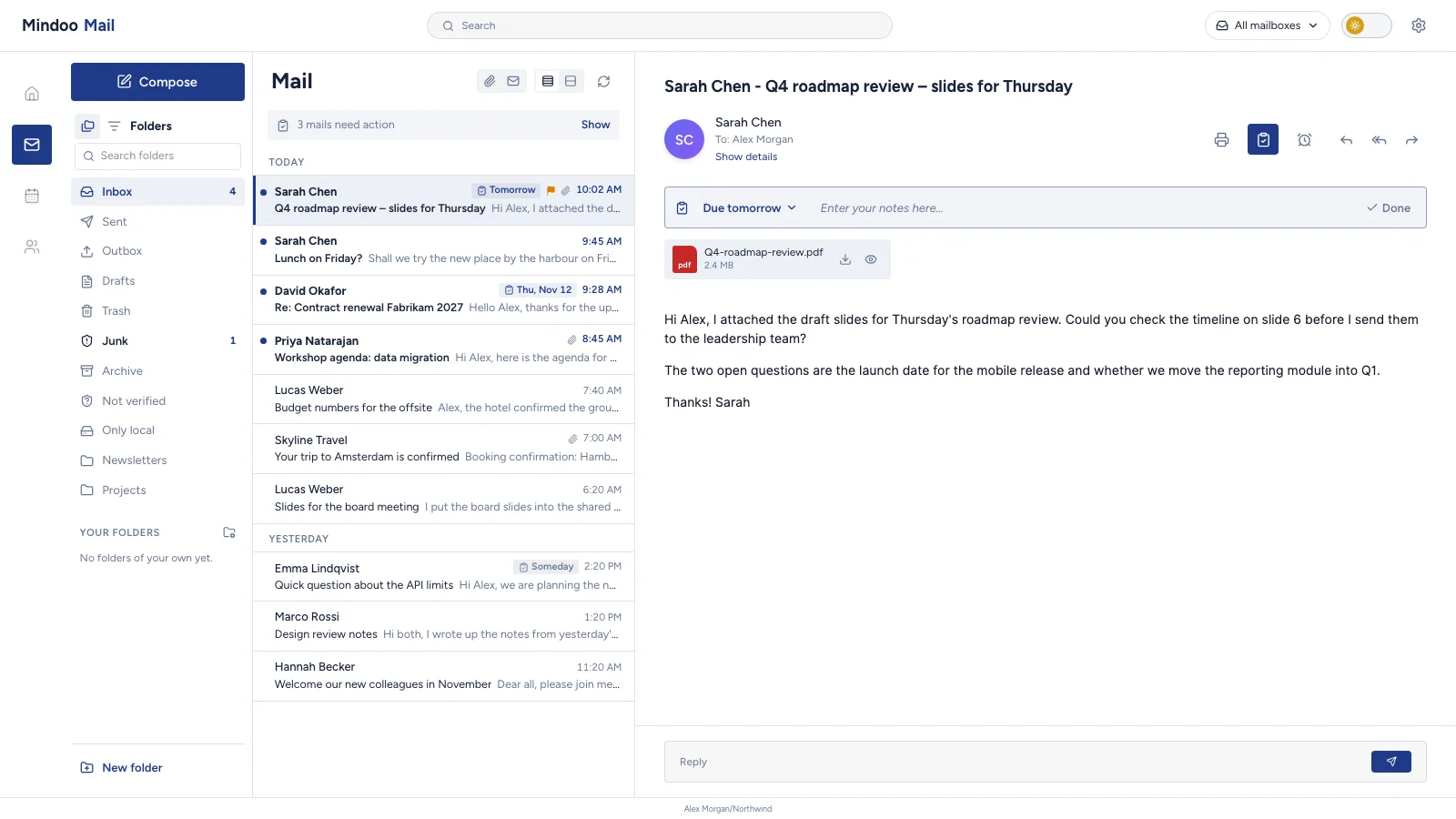
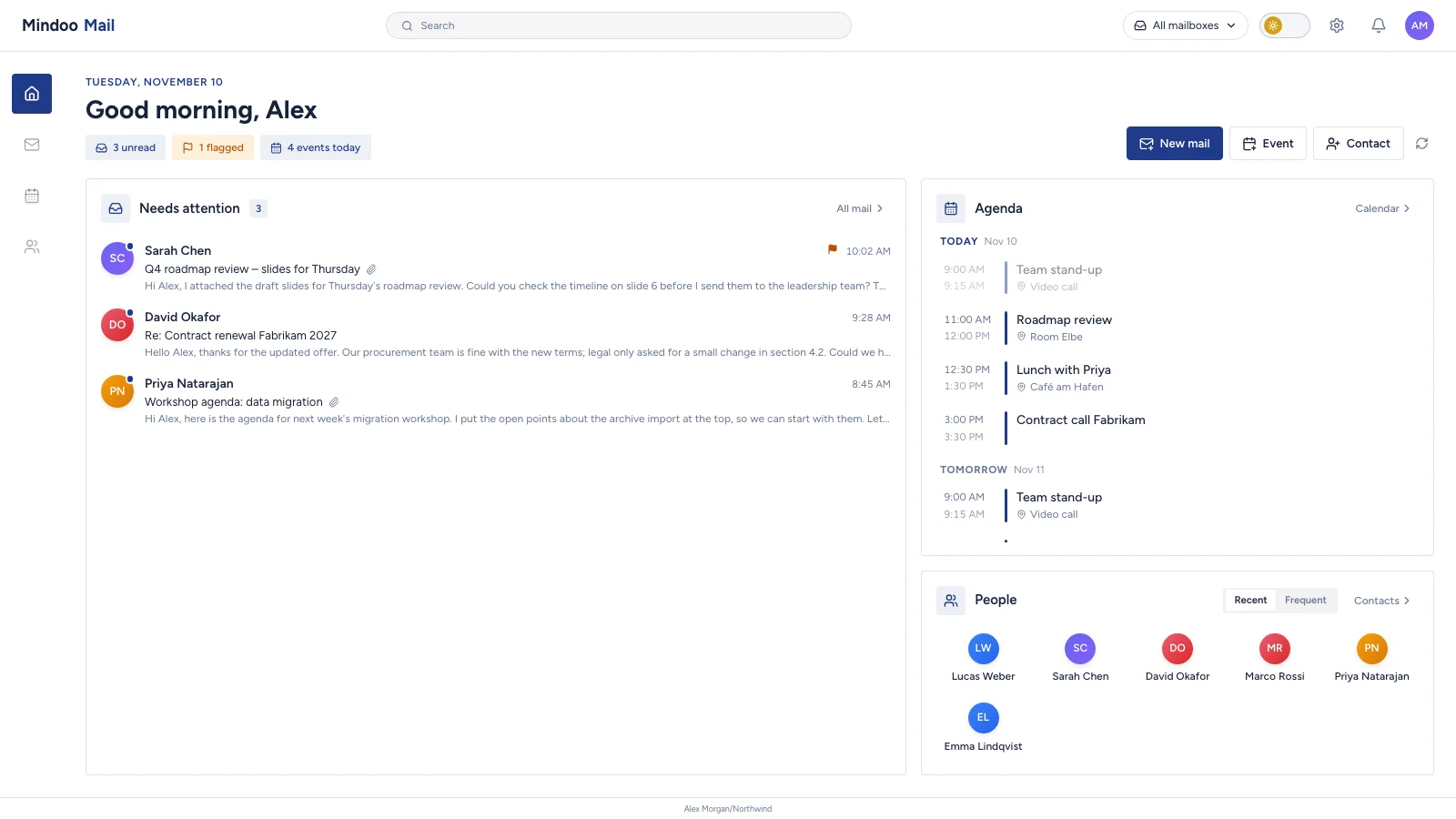
- A home screen with the mail that needs your attention, today’s agenda and the people you write with.
- All accounts in one place, or one at a time, with their folders side by side.
- Action required with a due date and a note, snooze a mail until later, and send later.
- Conversations: the whole thread below the mail you read, with reply all and forward.
- Search across all accounts, with facets that narrow the results step by step.
- Privacy: remote images load only when you allow them, and tracking parameters such as
utm_sourceorfbclidare removed from links. - File a mail into other Haven apps, for example into a customer’s record in our CRM.
Calendar
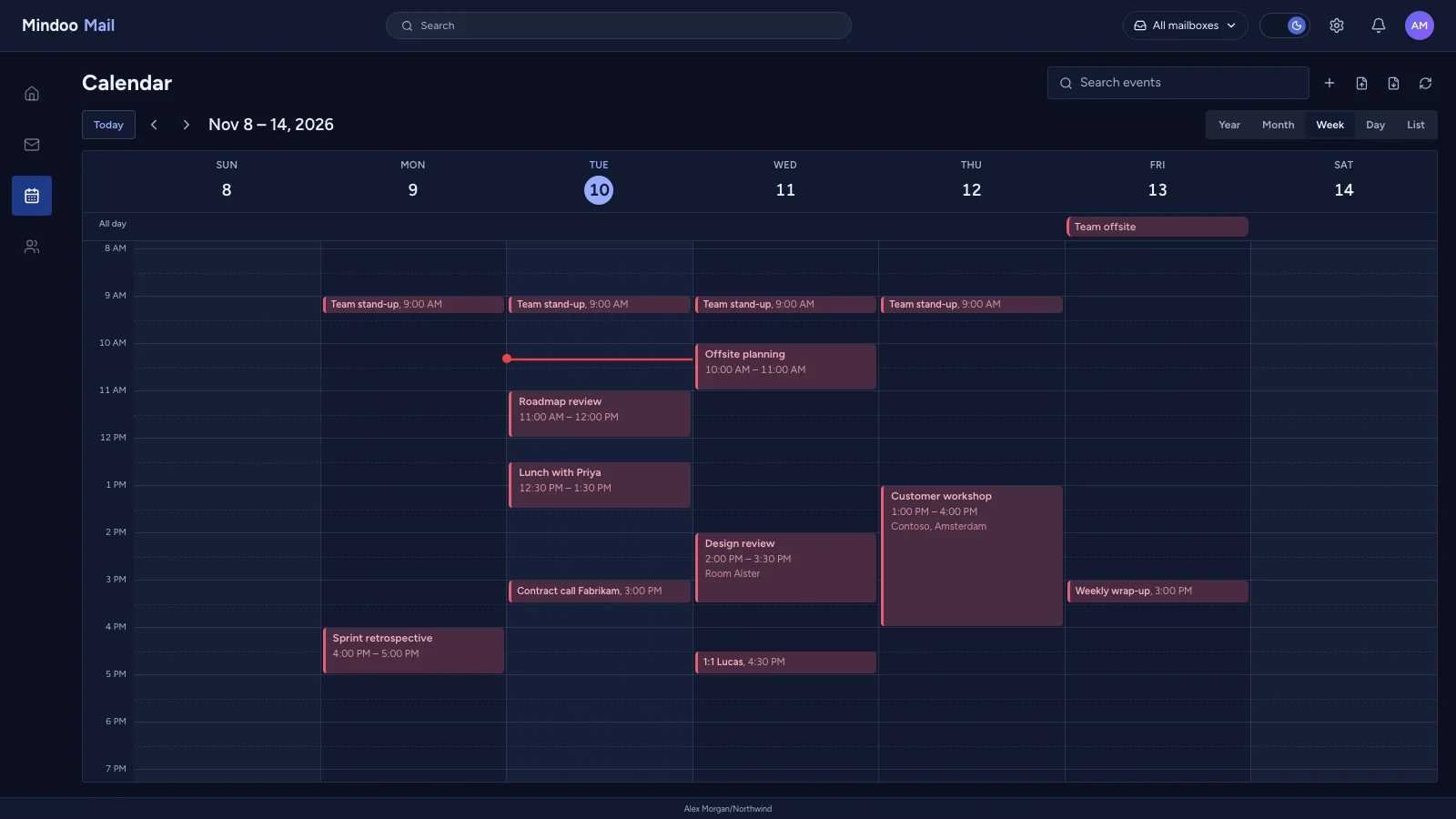
The calendar has day, week, month, year and list views, more time zones next to your own, and search across titles, places, guests and meeting notes. For Mindoo Mail accounts it handles the whole life of a meeting:
- Invitations to colleagues in the tenant and to people outside, who receive a standard invitation by mail.
- Answers: accept, tentative or decline.
- Proposals: a guest can propose another time. The organizer sees the proposal and accepts it, which moves the meeting, or declines it.
- Updates and cancellations: when the organizer moves, changes or cancels a meeting, every guest’s calendar follows, also for single occurrences of a series.
- A history per meeting: who invited, answered, proposed or moved what, and when.
- Show as busy, tentative, free or out of office, and private appointments.
Free and busy times, working hours and the scheduling assistant. Haven publishes your busy times for your colleagues, without titles, places or guests. You decide which calendars count, and you can set your working hours, with a time zone and the holidays of your region. When you plan a meeting, the scheduling assistant shows one row per guest and finds the next free time in which everyone is free and inside everyone’s working hours. A colleague’s public holiday counts as outside their working hours.
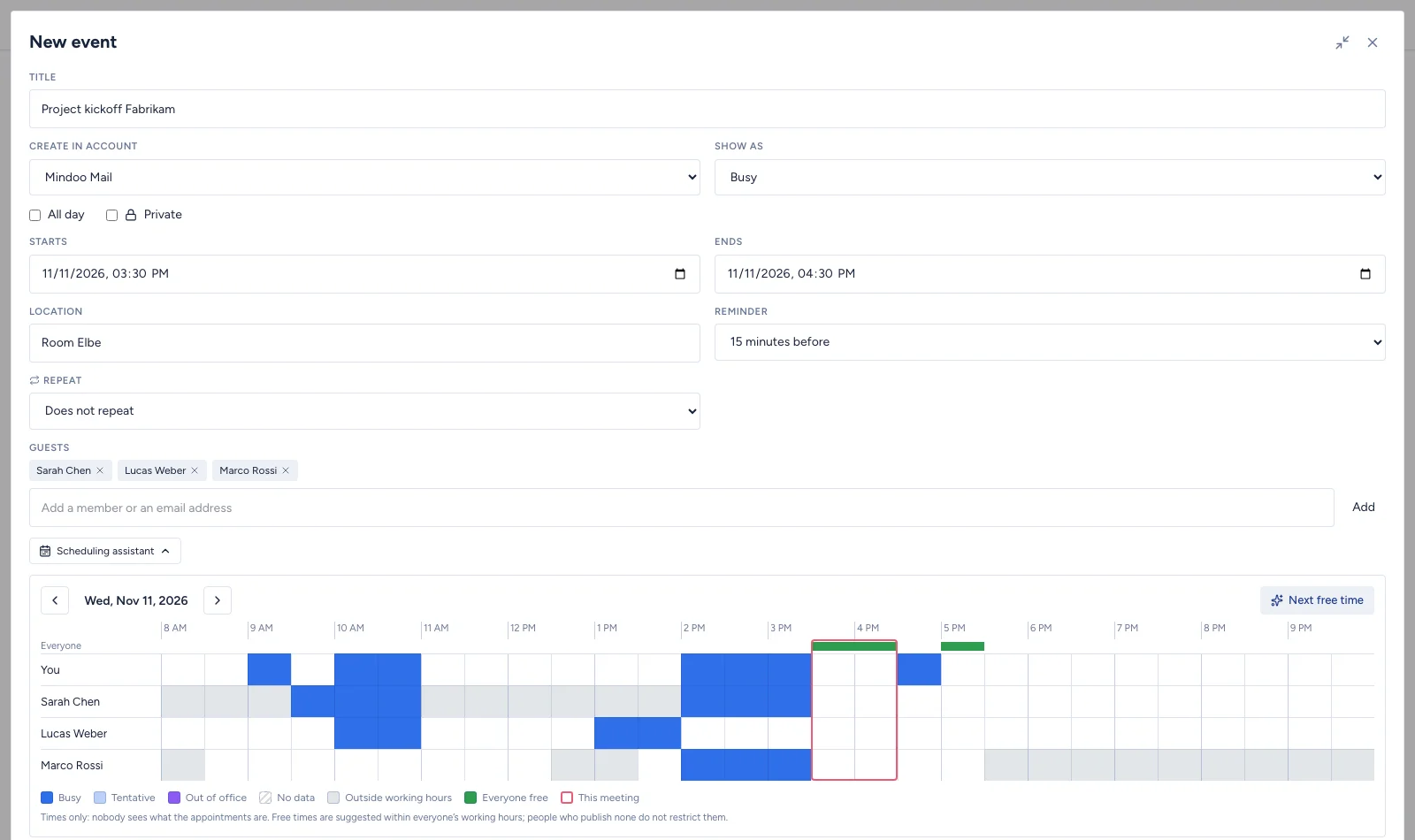
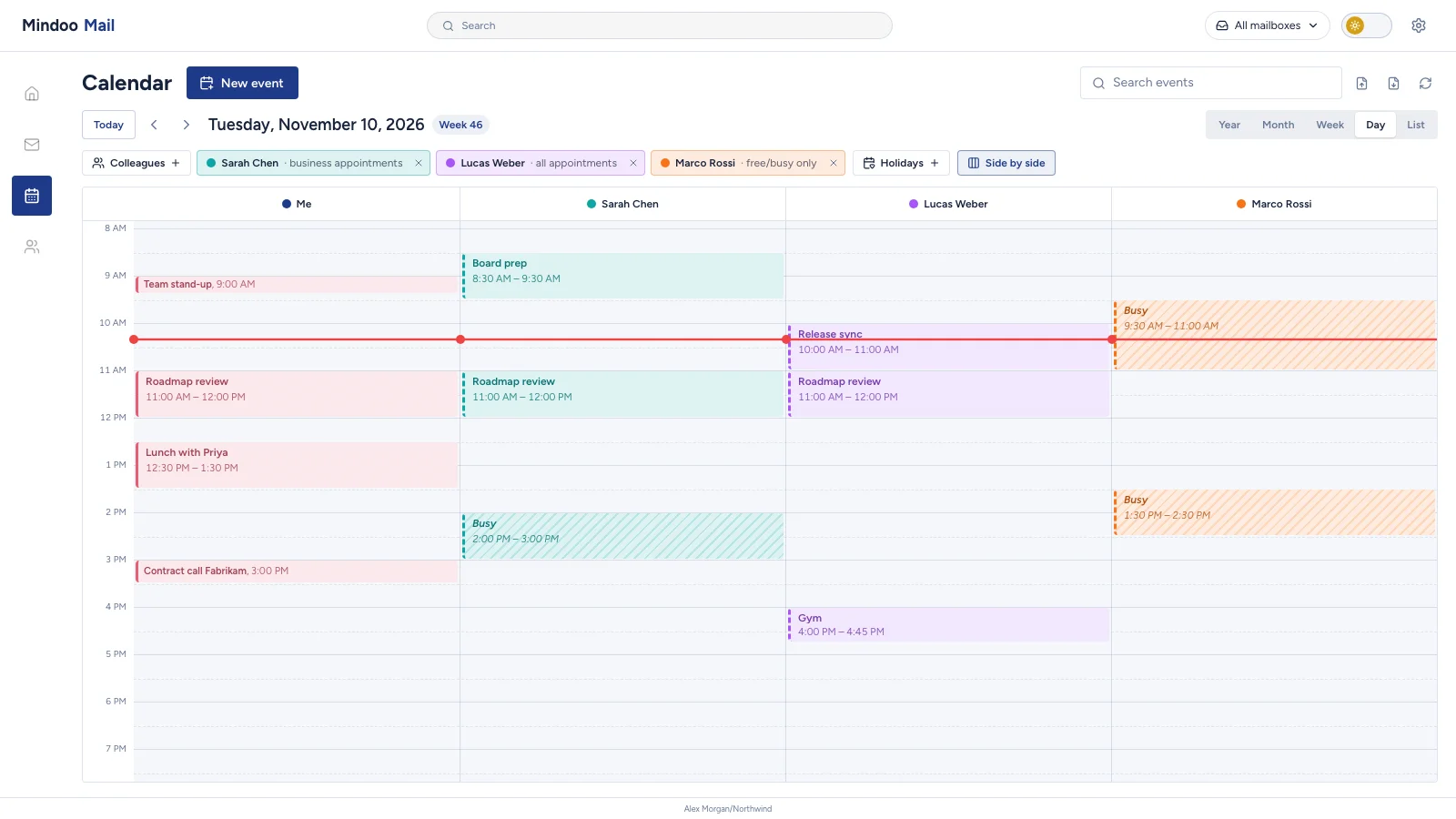
Sharing your calendar with colleagues. Free/busy is only the start. In Haven’s settings each person chooses what colleagues see of their calendar: nothing, free/busy only, business appointments, or all appointments. The tenant admin sets the default and the maximum. Then you add exceptions for single people, more for your assistant or your team lead, less for someone else. Private appointments always show as busy, and descriptions and guest lists are never shared. In Mindoo Mail you add colleagues’ calendars next to your own, layered in one view or side by side, each in its own color and labeled with what that person shares with you.
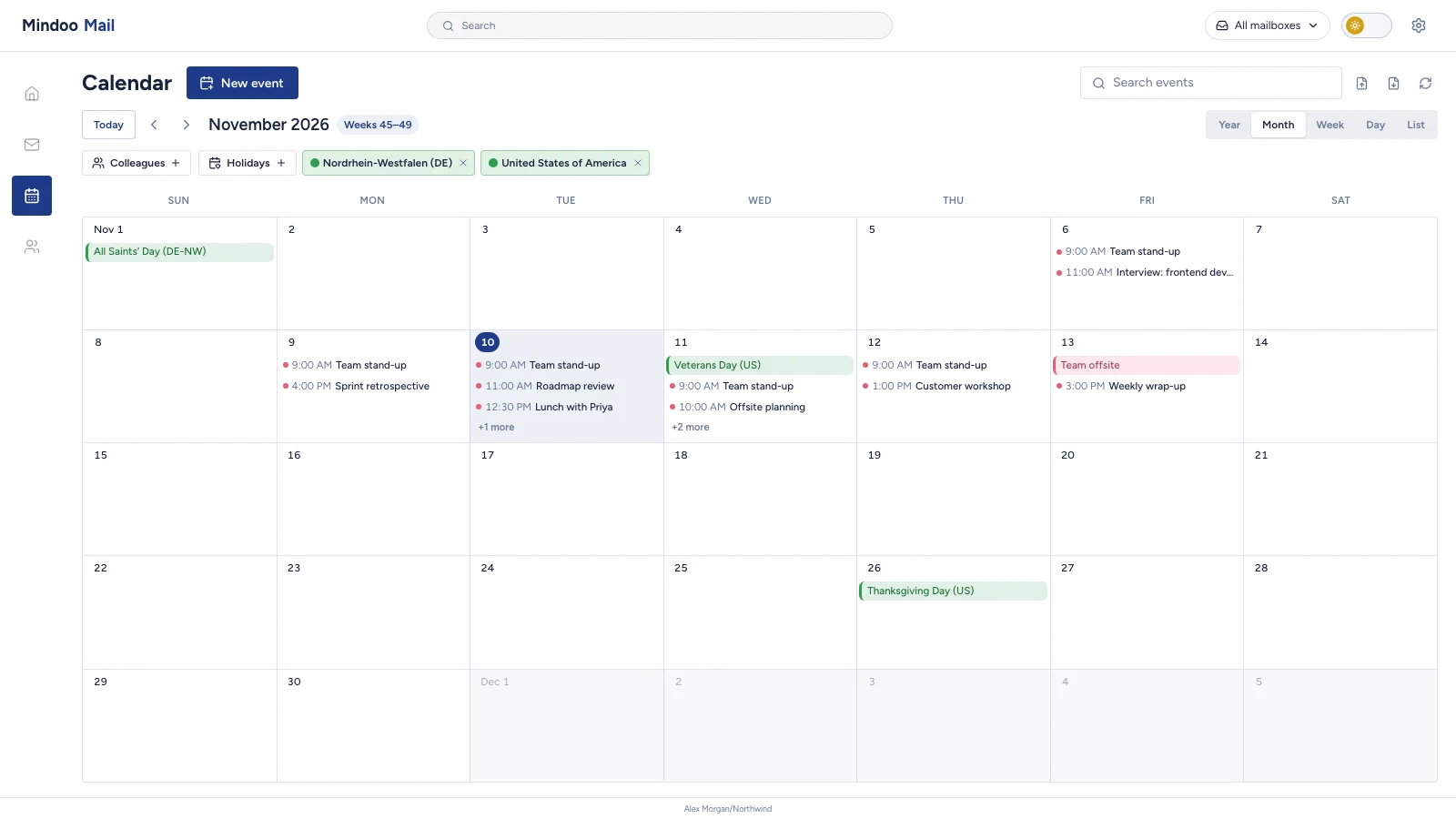
Public holidays. Pick up to three countries or regions, and their holidays appear as all-day entries. They are computed on your device and never stored or fetched from a server.
iCalendar import and export. Import an .ics file, from disk or straight from a mail attachment, and see what it contains before anything is created. Export your appointments as .ics just as easily.
Contacts
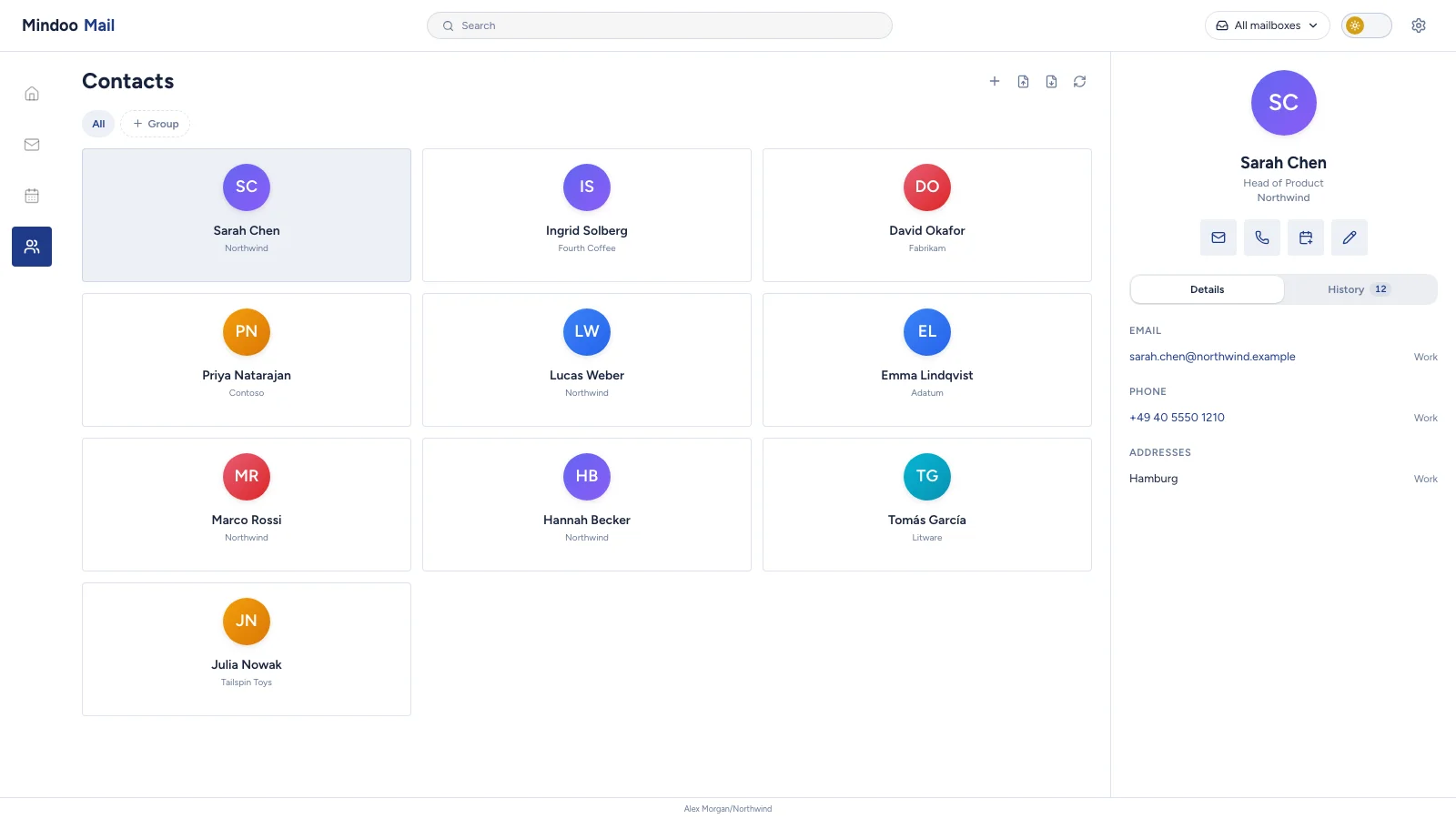
Contacts come with phone numbers, addresses, groups and photos, and with a history of every mail and meeting with that person. Import and export work with vCard (.vcf), from a file or from a mail attachment, and back out as a download, so your address book is never stuck in Haven either.
Mindoo Rooms: the right room for the meeting
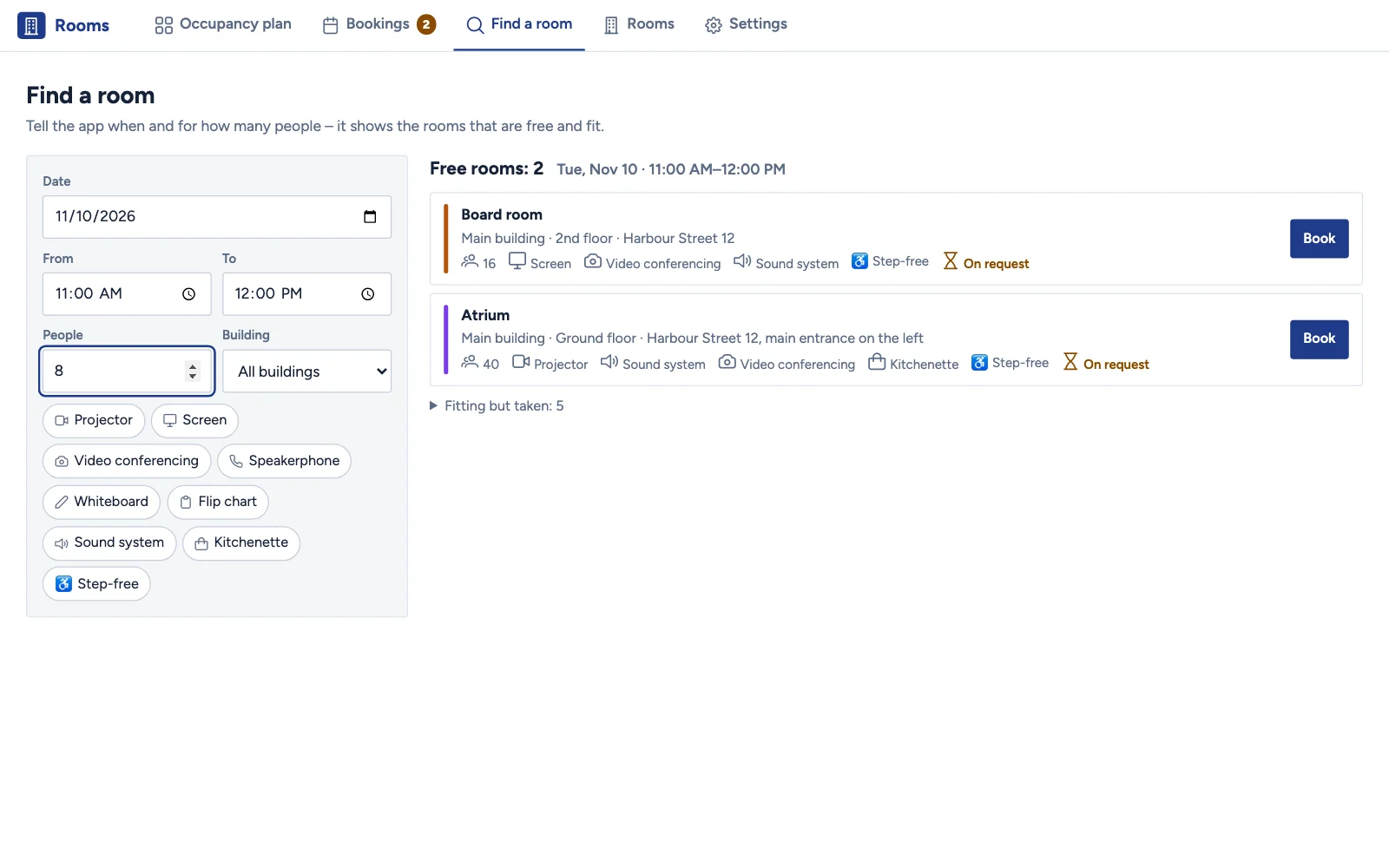
A meeting needs a place. Mindoo Rooms manages the meeting rooms of a team or a whole building, and it is built into Mindoo Mail’s event dialog: click Add room, and the room finder shows the free rooms that fit the number of guests. The booking moves with the appointment and is cancelled with it.
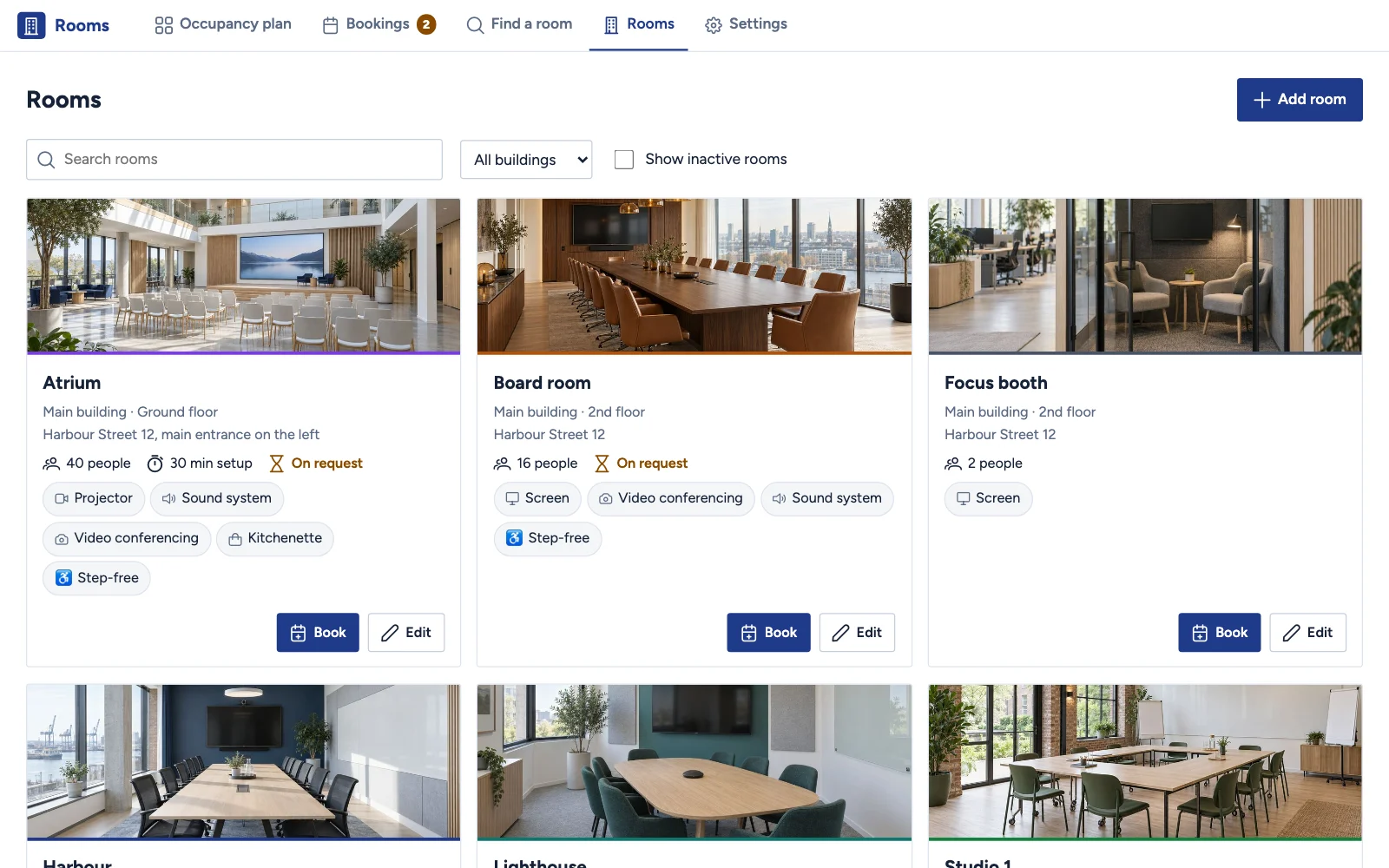
- Every room with a photo, building, floor and address, seats, setup time, equipment such as a projector, screen, video conferencing, whiteboard or kitchenette, and step-free access, so people find the right room and know where it is.
- The room finder shows the free rooms that fit by number of people, equipment and building, smallest first, or the next time a fitting room is free.
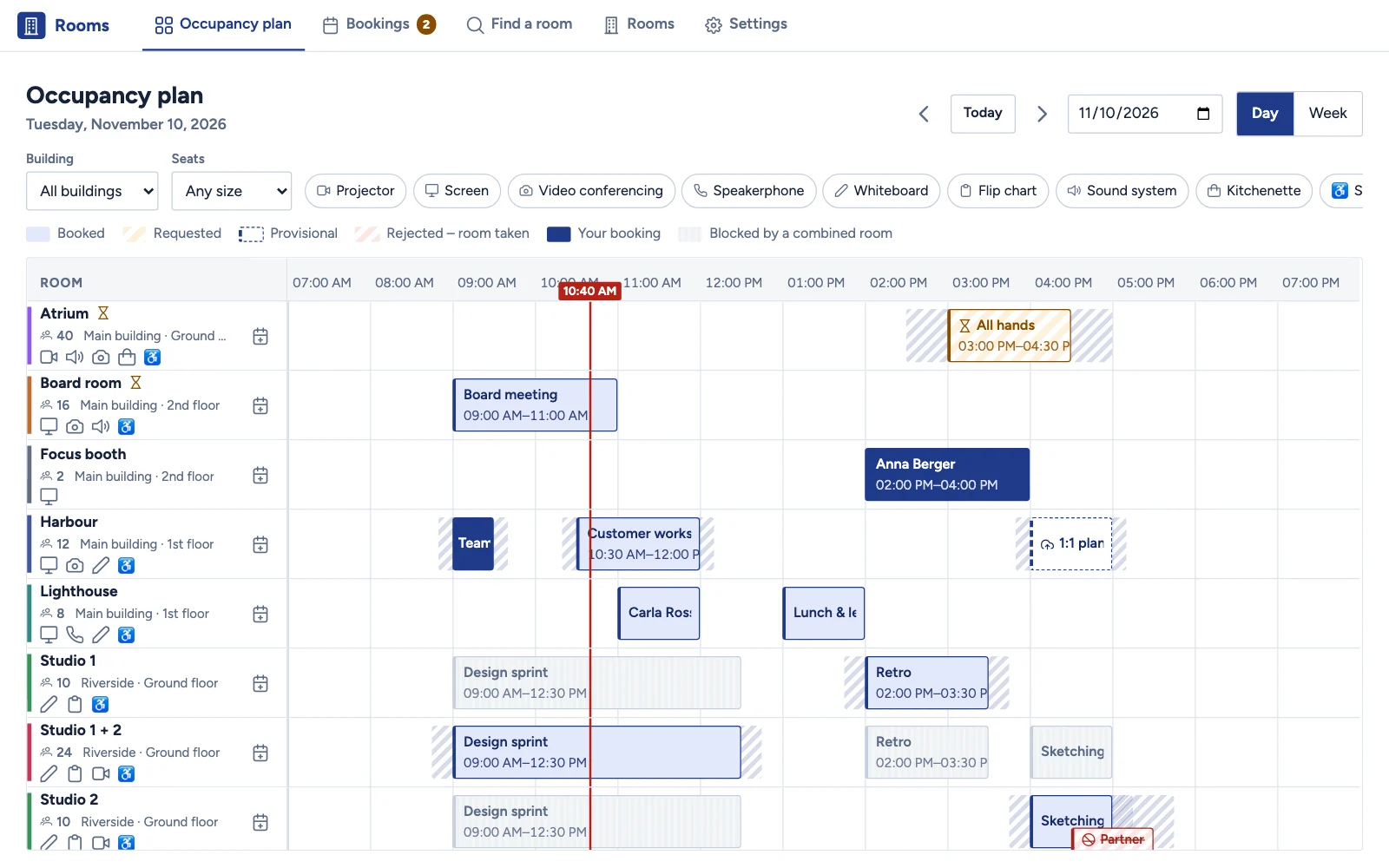
- The occupancy plan shows all rooms for a day or a week, with booked, requested, provisional and rejected bookings, setup times as hatched margins and the current time as a red line.
- Rooms on request need a manager’s approval, and combined rooms such as Studio 1 + 2 book all their parts.
- Fair when two want the same room: the MindooDB server’s signed time stamp decides who was first, and every device comes to the same result. A booking made offline stays provisional until the server has seen it.
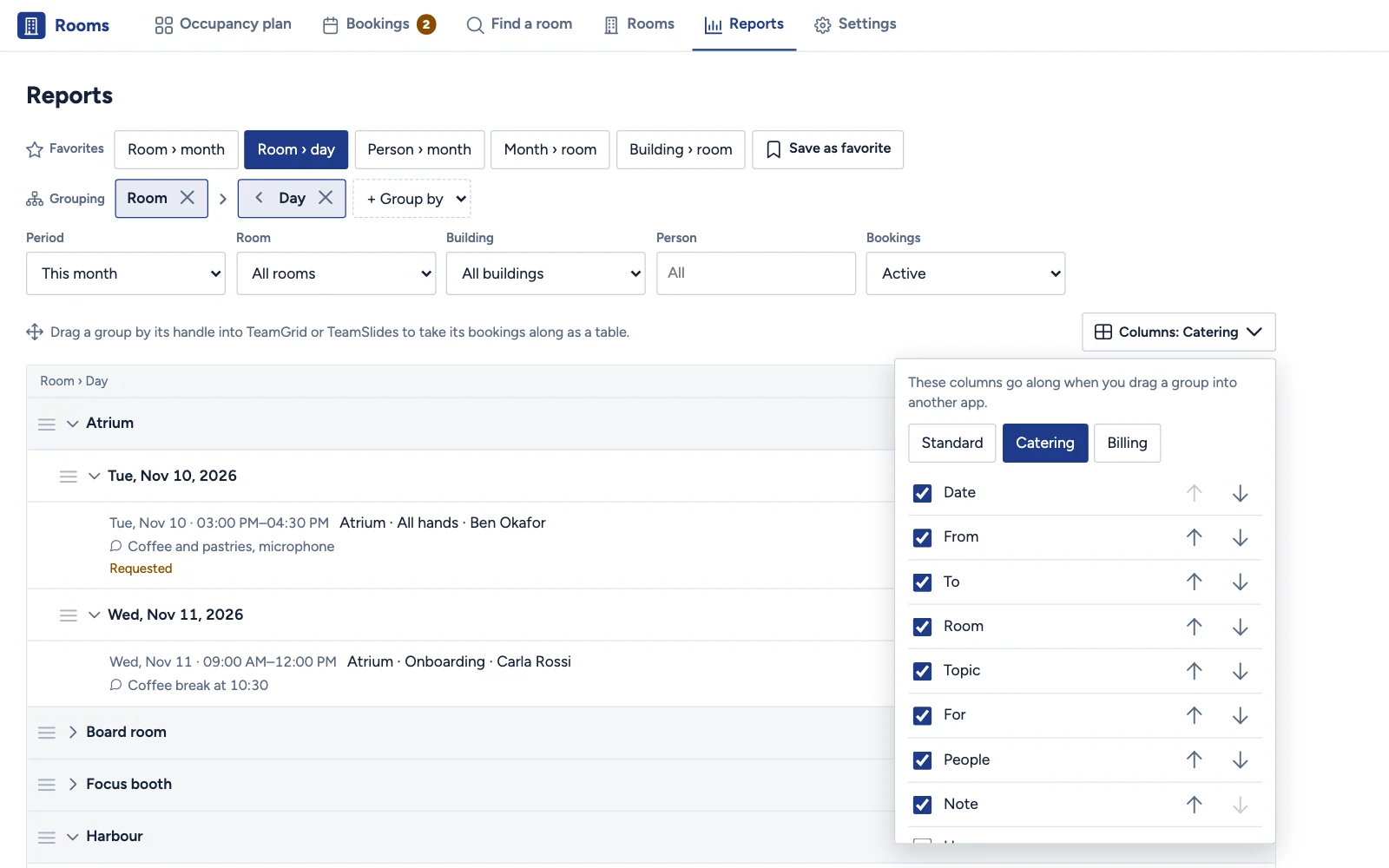
Reports for billing and catering. Many companies charge rooms and catering to cost centers. The Reports tab collects the bookings of a week, month or year, filtered by room, building, person and state, and groups and sorts them the way you click them together, for example room › month or person › month, with the number of bookings, hours and people per group. Every booking can carry a note for catering, setup or billing. Then drag a group into TeamGrid, our spreadsheet app, or into TeamSlides, and it arrives as a table with the columns you chose: standard, catering, billing or your own.
When can you use it?
Mindoo Mail, the gateway and Mindoo Rooms are in their final round of testing on our own servers and devices, and they are coming to the Haven App Store and to our hosted MindooDB servers. If you would like to run the gateway for your own domain early, or try Mindoo Mail with your company’s Microsoft 365 or Domino server, get in touch.
Until then:
- Open Haven in any modern browser at haven.mindoodb.com, or download Haven Desktop for macOS and Windows.
- Read more about the encryption underneath in Encrypt this for Alice and in our deep dives into MindooDB.
- Have a look at Stalwart, the mail server our gateway builds on, and at our Stalwart fork.