Karsten Lehmann 17 May 2026 17:51:00
It is Monday morning, the team is in the sprint retrospective, and somebody asks the obvious question: “What did our planning actually look like at the start of the sprint? We changed so much in between.”
Until today, that meant digging through document history one record at a time, comparing JSON diffs, and trying to imagine what the Kanban board would have rendered if the data had stayed unchanged.
From today on, it means setting one date in the application registration, opening a second browser window, and looking at last sprint’s plan in the same Mindoo Vega Kanban your team uses every day - right next to the live one. Same UI, same controls, same swimlanes - but the right window is rendering the past.
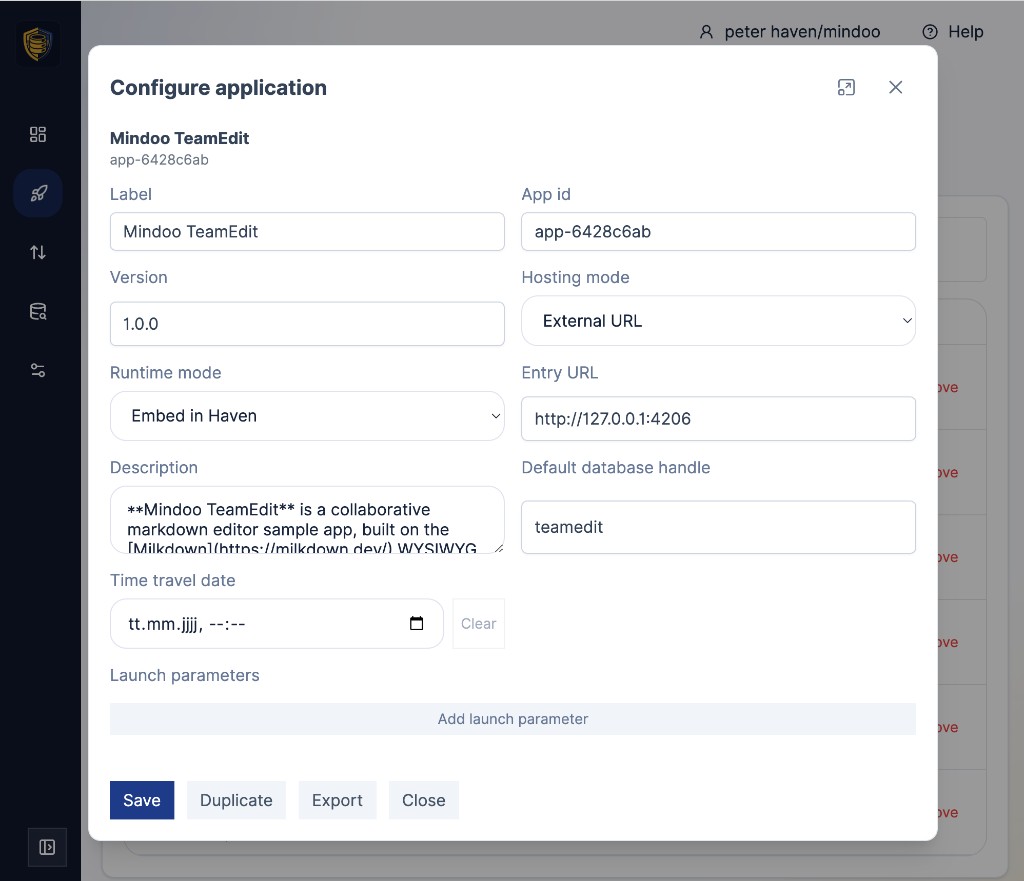
We just shipped application time travel in MindooDB Haven. Open the Applications screen, edit any registration, and the Configure application dialog now has an optional Time travel date field.
Set a date and time, save, and from that moment on every launch of this registration opens in a read-only snapshot mode: every mapped database, every virtual view it sees, every document, every attachment is served as it would have looked at that exact instant. Clear the field - or just launch the live registration next to it - and you are back in the present.
No backup to restore, no parallel database to set up, no exporting and re-importing data. The history was already there, signed and chained inside MindooDB. Haven now lets you walk into it through the front door of any app you registered.
Single-document time travel has been part of Haven since the beginning. The Database Browser has long been able to reopen one database as a read-only snapshot at a chosen date and time, and the Document History view shows every signed revision as a node in the change graph.
That covers debugging and audit at the document level - “what did this single record look like last Tuesday?” - but it does not cover what most teams actually want to see, which is what their application looked like last Tuesday.
A real Haven app often touches more than one database. Many split their data across a content database and a separate configuration database:
- a DMS reading its filing structure, document types, and folder tree from a config database while the actual files live in another;
- an app with controlled vocabularies that resolves stored keyword codes to human display values through a config database;
- a CRM that pulls its pipeline definitions, custom fields, and team assignments from a config database before rendering customer records from the data database.
Mindoo Vega itself can be pointed at several databases at once, each one carrying its own mindmap or Kanban that the app lets you switch between - so even a single Vega registration commonly spans more than one database, and you want all of them pinned to the same moment when you go time-travelling.
Pinning one of those databases to last Tuesday and leaving the others on today’s data would produce nonsense: a filing structure that does not match the documents in it, keyword codes that no longer resolve, custom fields that did not exist yet, attachments that have not been uploaded.
Application time travel solves that by pinning all of an app’s mapped databases - and the virtual views that may pull across tenants - to the same moment, atomically, for the whole session.
The mechanic underneath is deliberately simple. Each application registration carries an optional timeTravelDate. When set, Haven’s SDK connector intercepts every call the app makes and answers it from history: list calls return the documents that existed at that point in time, document reads return their signed revision as of that point, attachment reads stream the bytes of the historical attachment chunks rather than today’s appended ones, and writes are refused at the connector with a clearly distinguishable error code so the app cannot accidentally edit the past.
The app does not need to know about time travel at all - we did not change a single line in the four sample apps that ship pre-configured in Haven (Mindoo Vega, Mindoo TodoManager, Mindoo TeamEdit, and Mindoo TeamGrid) to support this. The same is true for any third-party MindooDB app: drop a date into the registration, relaunch, and the app sees a consistent past.
That is why this is not just a Haven feature; it is an SDK feature, available out of the box for every app you build on MindooDB.
A small but important detail: time travel includes attachment data, not just structured fields. Attachments in MindooDB are content-addressed and chunked, and a single attachment can grow over time as new chunks are appended.
Without revision-aware reads, a “historical” download would happily include bytes that did not exist yet at the moment you are looking at - the document version would be old, but the file you opened from it would be today’s file. Application time travel propagates the snapshot date all the way down to the attachment store, so the bytes you see are the bytes that existed then.
The screenshot embedded in last quarter’s status report shows the chart as it was before this morning’s data correction; the photo pinned to a Kanban card shows the version that was attached when the card was created, not the one that was swapped in two weeks later.
The most useful workflow is the duplicate flow. Leave the live registration as it is - the one your team uses every day to do work in the present. From the row’s overflow menu, press Duplicate.
Open the copy in the Configure application dialog, give it an obvious label like Mindoo Vega (sprint start, 2026-04-29), set the Time travel date to the moment you want to revisit, and switch the Runtime mode to Open in new window so the snapshot opens in its own browser tab instead of inside Haven. Save.
You now have two registrations side by side in the Applications catalog - one live, one historical - with identical data mappings, which means the configuration database, the named views, the attachments, and the document layout the app expects all line up correctly with the snapshot.
Launch both. Drag one window to the left half of your screen and the other to the right, or pull them onto two monitors. You are looking at the same app, in the same UI, with the same controls - one rendering today’s data, the other rendering the data that existed at the pinned moment.
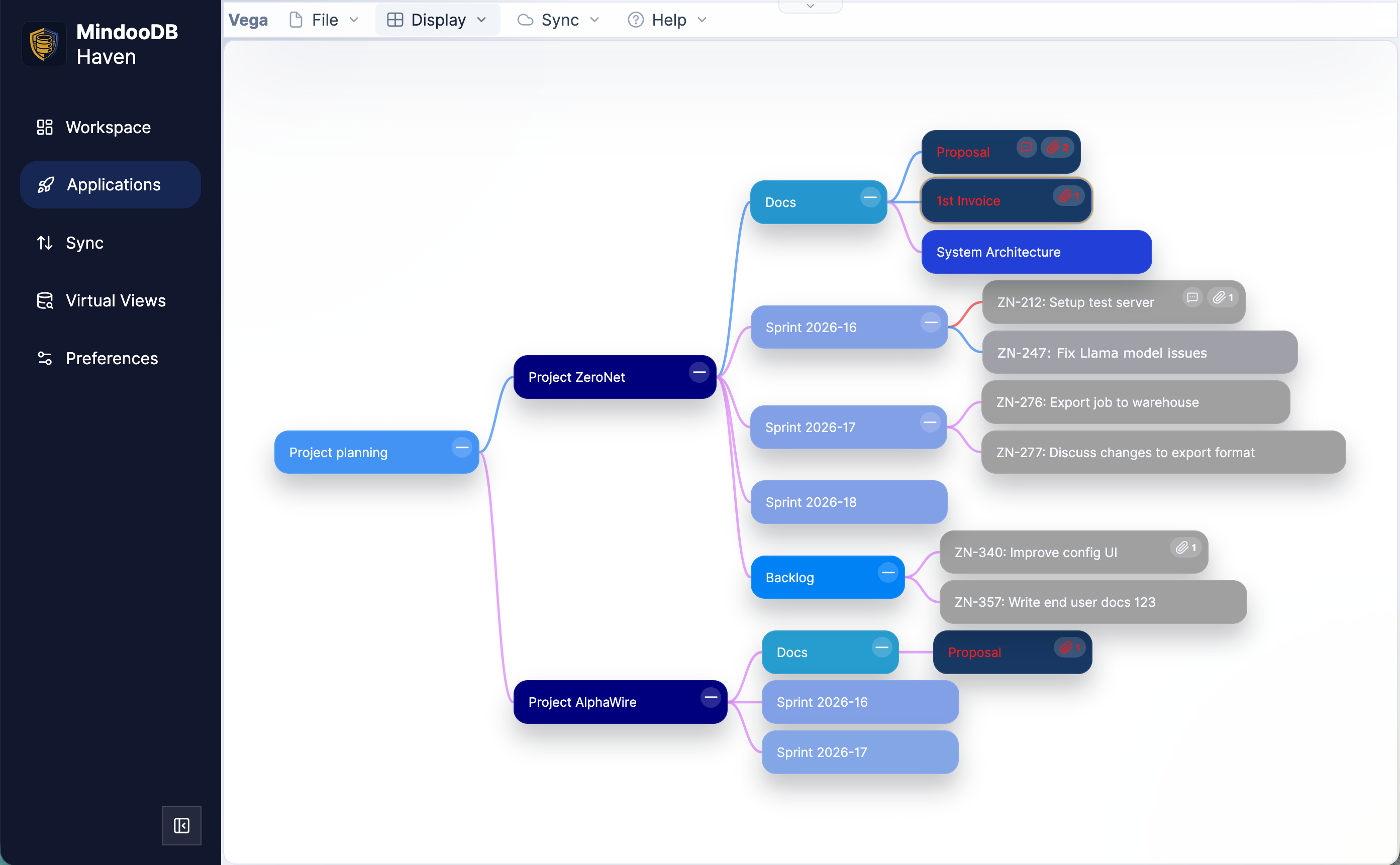
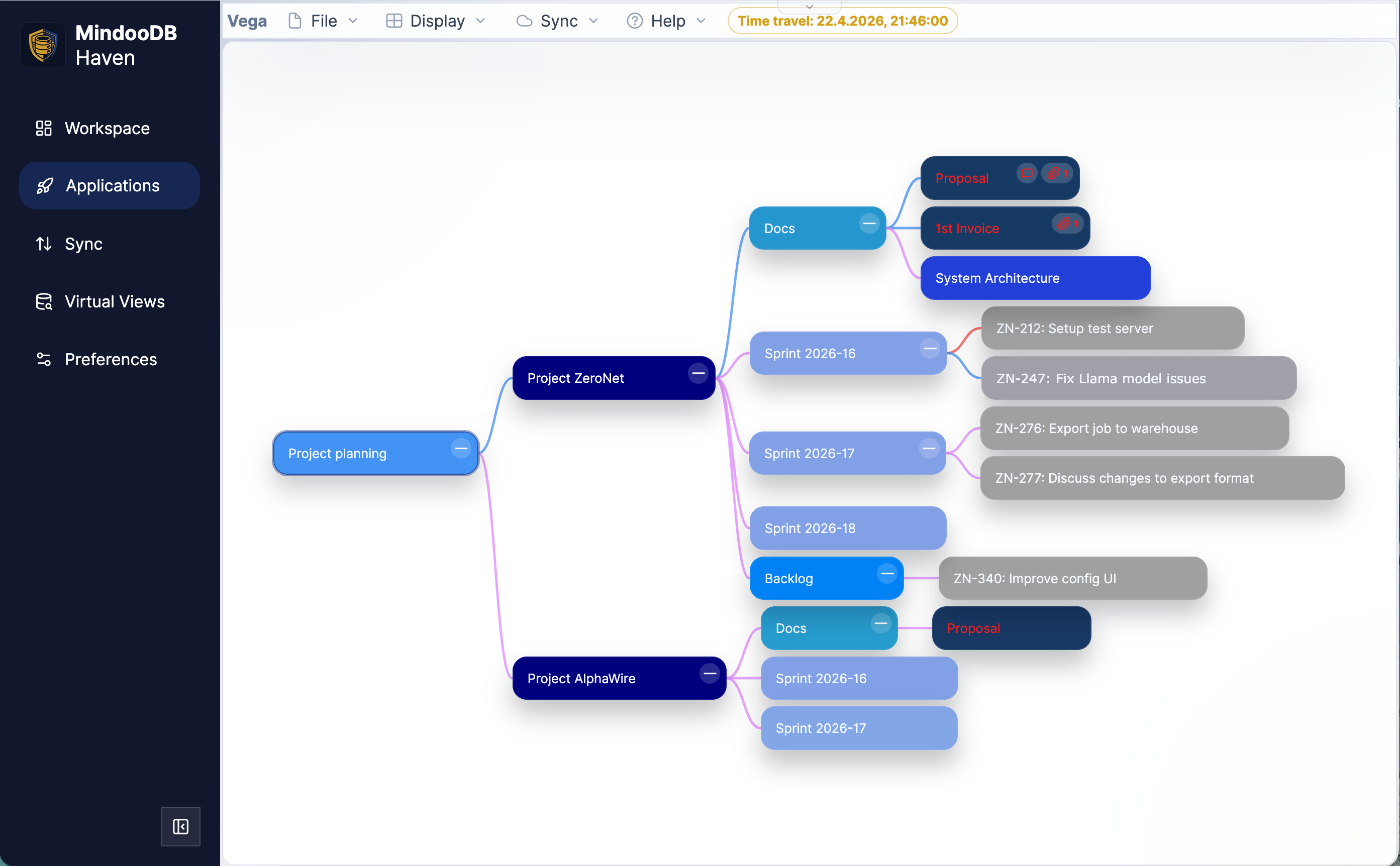
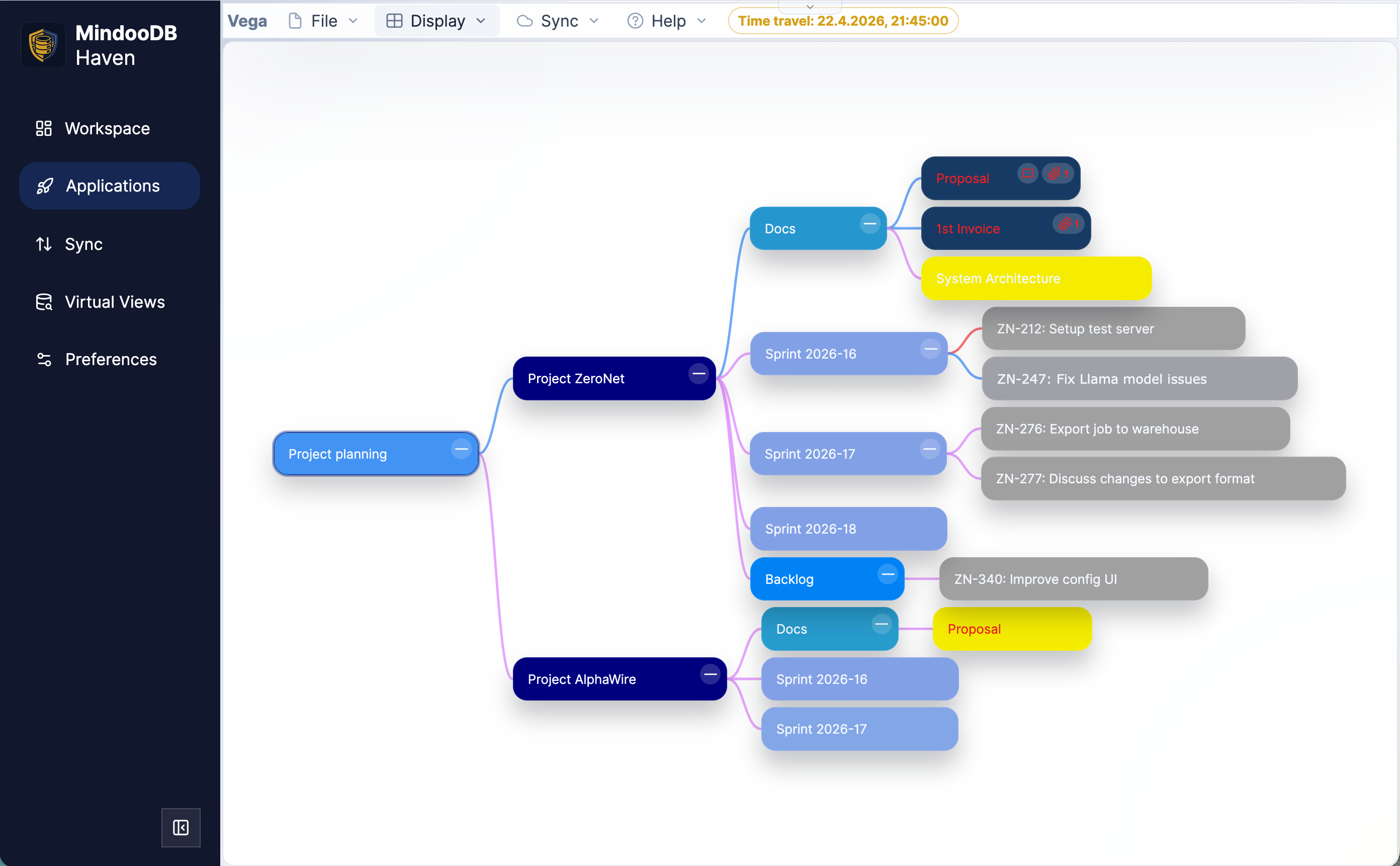
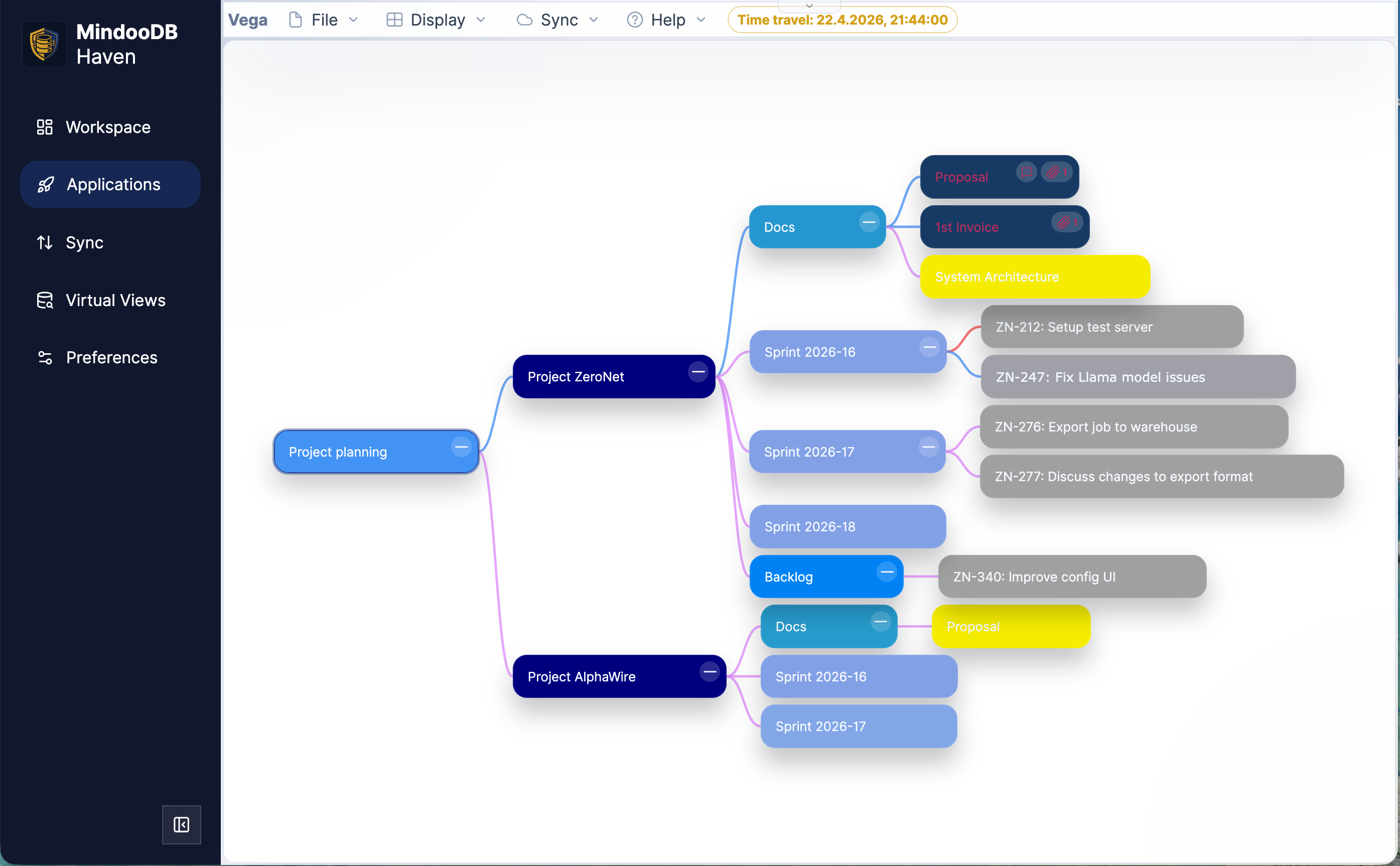
Click around freely; nothing in the past can be edited, because the connector simply refuses to write. (Look, but don’t touch - we’d rather not be the first MindooDB feature retired because somebody created a grandfather paradox in the support queue.)
And because the duplicate is just a registration, you can keep more than two: yesterday, sprint start, the close of the previous quarter, the day before the migration. Each one is a launchable, walkable snapshot of the app as a whole.
Why this matters, in plain terms:
- Audits and compliance. When a reviewer or regulator asks “show me how this looked at the close of the previous reporting period”, the answer is one date field and a launch button. Every change in the underlying data is signed by the user who made it, chained to the change before it like a block in a blockchain, and encrypted before it ever leaves the device. Nothing in that chain can be rewritten silently - dropping or altering an earlier change would break every link that follows. The time-travelled app is therefore not just a convenient view; it is a tamper-evident, cryptographically verifiable rendering of the past, presented in the same UI the team used at the time.
- Retrospectives and planning reviews. Open last sprint’s plan next to today’s plan in two Mindoo Vega windows and walk through what changed: which tickets moved between swimlanes, which were added late, which slipped to the next sprint, which acceptance criteria shifted. The same trick works for the Mindmap projection of the same data - useful when the conversation is about scope and structure rather than columns and statuses. A side-by-side comparison in the actual planning UI is far more useful than diffing JSON.
- Regression debugging. “It worked yesterday” stops being a guess. Pin the app to yesterday morning, reproduce, then pin to yesterday evening, reproduce again. The exact data state at each moment is reachable directly, in the real app, with the real attachments.
- Internal investigations. When a number on a dashboard looks wrong, you can see the data the dashboard was built from at the moment the report was generated, not just today’s numbers reverse-engineered backwards.
- Historical research and onboarding. New team members can wander through earlier states of a project in the tools they will use going forward. That is a much faster way to understand context than reading change logs.
Two short notes for developers building on the MindooDB App SDK.
First, you do not have to do anything special to make your app participate. The granular CRDT operations in the MindooDB App SDK (set, unset, listInsert, listDelete, plus baseHeads) - the same ones used by Mindoo TeamEdit and Mindoo TeamGrid - all participate in time travel for free, because the snapshot is enforced one layer below them, in the connector.
Second, write attempts in time travel mode are surfaced as a clearly distinguishable error code rather than a silent no-op, so a well-behaved app can notice the read-only state and grey out save buttons or show a small banner. The four sample apps that ship pre-configured in Haven do exactly that today, and the SDK README documents the launch context fields and the read-only error code so you can wire up the same UX in your own app in a few lines.
The deeper point is that any of this only works because of the data model underneath. MindooDB stores every document as a content-addressed Automerge CRDT, every change signed with the author’s Ed25519 key, every change cryptographically linked to the change before it, and the whole stream encrypted with AES-256-GCM before it leaves the device. The server only ever sees ciphertext.
That structure is several things at once: a CRDT that merges concurrent edits without conflict dialogs, an append-only audit log that cannot be quietly rewritten, and - now visible from the front of the product - a navigable timeline that any app on Haven can step into at no extra cost.
Encrypted, digitally signed, blockchain-style history is a real differentiator for MindooDB and Haven, and what we like about application time travel is that it turns that differentiator from an architecture diagram into something a non-technical team member can use on a Monday morning.
Application time travel is live in haven.mindoodb.com today. Open the Applications page, edit any registration, and look for the Time travel date field in the Configure application dialog. The MindooDB App SDK is open source on GitHub, and the platform underneath is open source under Apache 2.0 at mindoodb.com.
And for the inevitable question: yes, time travel into the future is also high on our internal wish list. We are currently blocked on the slightly harder problem of getting MindooDB to cryptographically sign documents that have not been written yet. We will let you know as soon as we have a working prototype.