Karsten Lehmann 10 September 2026 09:00:00
Three weeks ago I did something silly with a phone. The question behind it was serious - what is the smallest machine that can run a MindooDB server? - and the answer turned out to be “smaller than you would like”, because a Debian VM running emulated x86_64 inside UTM SE on an iPhone 17 managed it. It took 75 minutes to build the Docker image and 102 seconds to generate a single server identity, but it ran. That story is here, and it ended with a promise: the hardware actually meant for this was in the post, and I would write up how it did.
It was in the post for rather longer than anyone expected. But it is here now, and it is very small.
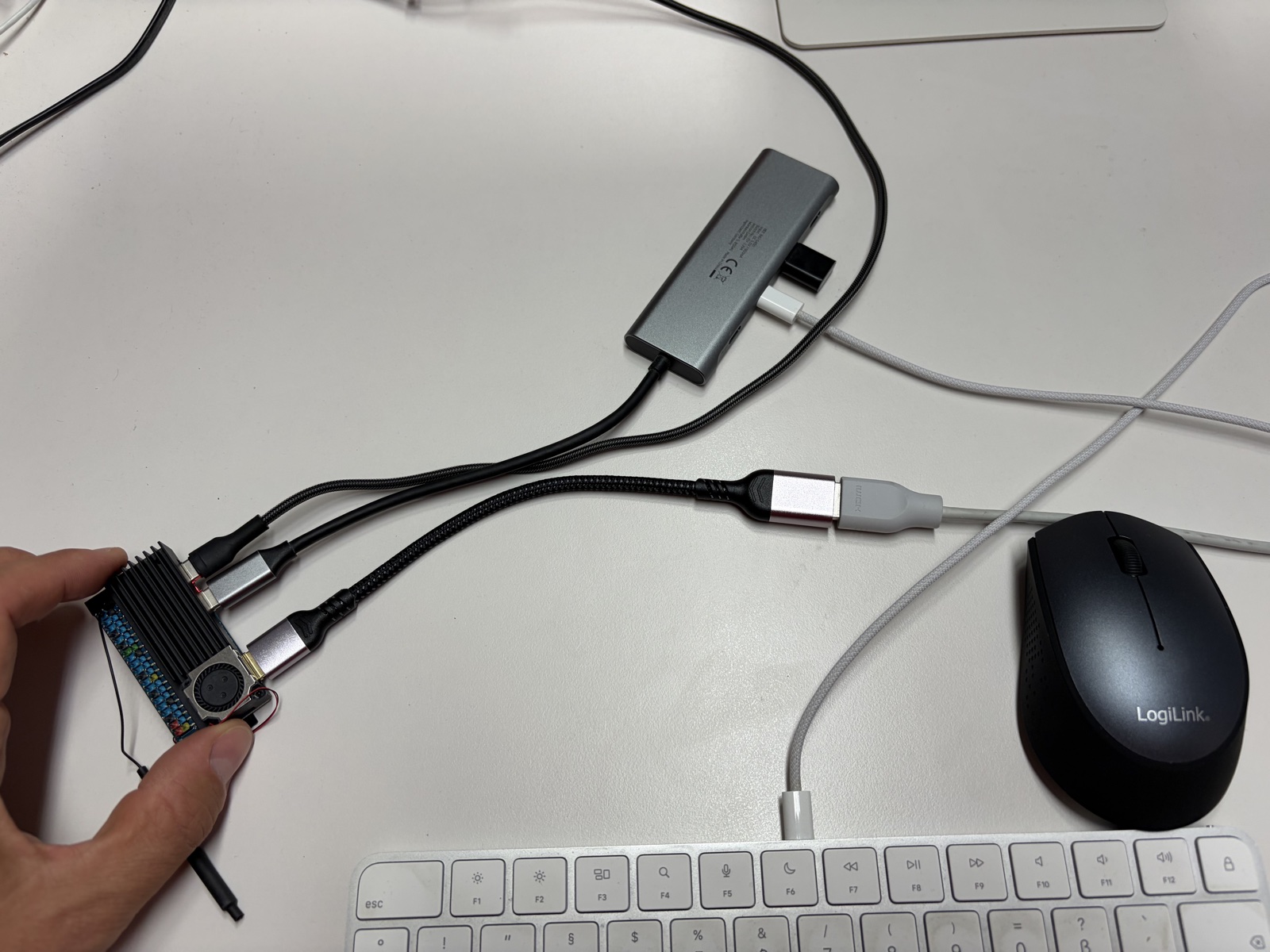
Ten days, two continents, and a week in Cologne
The board is an Orange Pi Zero 3W, ordered from Amazon for $85 plus tax and shipping. It left the shipper in Dallas on Friday 28 August and was handed over at my door in Karlsruhe on Monday 7 September - ten days to move 65 by 32 millimetres of circuit board across the Atlantic.
The tracking history is the best part of the whole purchase, so it gets a screenshot of its own.

Read from the bottom: Dallas on the Friday evening, Louisville in the small hours of Saturday, customs cleared in Cologne at 8:17 on Saturday morning - and then, at 12:43 that same day, the package leaves a carrier facility in Louisville, Kentucky again. From Monday 31 August to Friday 4 September it repeats the identical three-line refrain every evening in Cologne: package in transit, flight containing package has arrived; package arrived at a carrier facility; package in transit, flight containing package has arrived. Five nights running, in the same city, apparently getting on and off aeroplanes.
My working theory is that the board is so small it kept slipping down the back of the sorting machine. :-)
So what is an Orange Pi Zero 3W?
It is a single-board computer measuring 65 x 32 mm and weighing about 14 grams - roughly a Raspberry Pi Zero, which is to say roughly a large stick of chewing gum. What is inside it is the surprising part.
| Component | Specification |
|---|---|
| SoC | Allwinner A733 |
| CPU | 8-core 64-bit ARM: 2x Cortex-A76 up to 2.0 GHz + 6x Cortex-A55 up to ~1.8 GHz |
| Additional core | Xuantie E902 RISC-V real-time core, up to 200 MHz |
| RAM | 1 to 16 GB LPDDR5-4800, depending on model |
| GPU | Imagination BXM-4-64, OpenGL ES 3.2 / Vulkan 1.3 / OpenCL 3.0 |
| NPU | Integrated AI accelerator, up to 3 TOPS |
| Storage | microSD; optional eMMC and UFS 3.0 configurations |
| Wireless | Dual-band Wi-Fi 6, Bluetooth 5.4 |
| Ethernet | None onboard |
| USB | USB-C USB 3.1 OTG plus USB-C power |
| Expansion | PCIe Gen 3 x1 via FPC connector, 40-pin GPIO with UART, I²C, SPI, PWM |
| Display | Mini HDMI 2.0 up to 4K60, DisplayPort 1.4 Alt Mode over USB-C, MIPI DSI |
| Camera | 2x MIPI CSI |
| Power | 5 V / 3 A over USB-C |
| Size / weight | 65 x 32 mm, about 14 g |
| OS | Orange Pi OS, Ubuntu, Debian, Android |
For a MindooDB server most of that list is irrelevant - the GPU, the NPU, the camera inputs and the 4K output are for other kinds of projects. What matters is the combination in the middle: eight ARM64 cores, several gigabytes of RAM, Wi-Fi 6, a normal Linux distribution, and a five-volt power supply.
The two Cortex-A76 cores are the reason this is not just another cheap board with more memory bolted on. The A733 is a heterogeneous design: two performance cores for the work that is actually hard, six A55 efficiency cores for everything else. Mine reports about 2.0 GHz on the A76 pair and 1.79 GHz on the A55s.
Mine is the 6 GB version, which turns out to be a comfortable size for a small MindooDB installation: room for 64-bit Linux, Docker, the server and the filesystem caches, with enough left over that nothing is ever operating at its limit. 4 GB would do this job too; 12 or 16 GB is more than an edge server of this kind will ever ask for.
Two caveats worth stating plainly. The first is storage: a microSD card is fine for an experiment, but for a server that runs permanently I would take an eMMC or UFS variant every time, for endurance as much as for throughput. The second is that there is no Ethernet port. Networking is Wi-Fi 6, or a USB adapter, or something on the PCIe connector. For a stationary server in a rack that would be a real objection. For the sort of compact, movable, occasionally-isolated node this article is about, it is not.
Ubuntu, in about ten minutes
There is not much of a story here, which is itself the story.
I downloaded the Ubuntu 26 image from the Orange Pi site, wrote it to a microSD card with balenaEtcher on macOS, plugged in a USB-C hub with keyboard and mouse, a second USB-C cable for power, and a mini-HDMI cable to a monitor. A few seconds later there was an Ubuntu desktop. I set up Wi-Fi and installed the Avahi daemon so the board would announce itself as orangepi.local instead of an address I would have to remember.
In principle it does not even need the Wi-Fi. The USB-C port is an OTG port, so the board can act as a USB device rather than a host, and Linux’s USB gadget subsystem can present it to whatever it is plugged into as a network adapter - USB Ethernet gadget mode, g_ether and its configfs successors, appearing as CDC ECM or NCM on macOS and Linux and as RNDIS on Windows. One cable to a laptop then carries power and a private point-to-point network, with no router and no access point in the picture at all. That is the configuration I would use for a server you hand to somebody in an envelope. Mine, for now, sits upstairs on the desk with Wi-Fi.
Docker was already there
Which meant I could go straight to the interesting part: clone the MindooDB repository and run the standard setup.
git clone https://github.com/klehmann/MindooDB.git
cd MindooDB
./serversetup.sh
No ARM64 branch, no special flags, no patched Dockerfile. The same serversetup.sh that runs on a laptop, asking the same questions: data directory, server name, bind address, port, unlock password. I called the server cn=orangepi1/o=mindoo and left it on 0.0.0.0:1661.
![The interactive serversetup.sh run on the Orange Pi: git clone of the MindooDB repository at 3.78 MiB/s, then the configuration summary for server name cn=orangepi1/o=mindoo, data directory ../mindoodb-data and container port 1661, the data directory being created, and the Docker build starting with the header "[+] Building 137.6s (19/19) FINISHED"](/blog/assets/10.09.2026090000KLEOPI/serversetup-start.png)
That header is the number I had been waiting for. 137.6 seconds for the nineteen-step build - the same build that took 4539.4 seconds on the phone.
The step-by-step log makes the comparison even less kind to the phone.
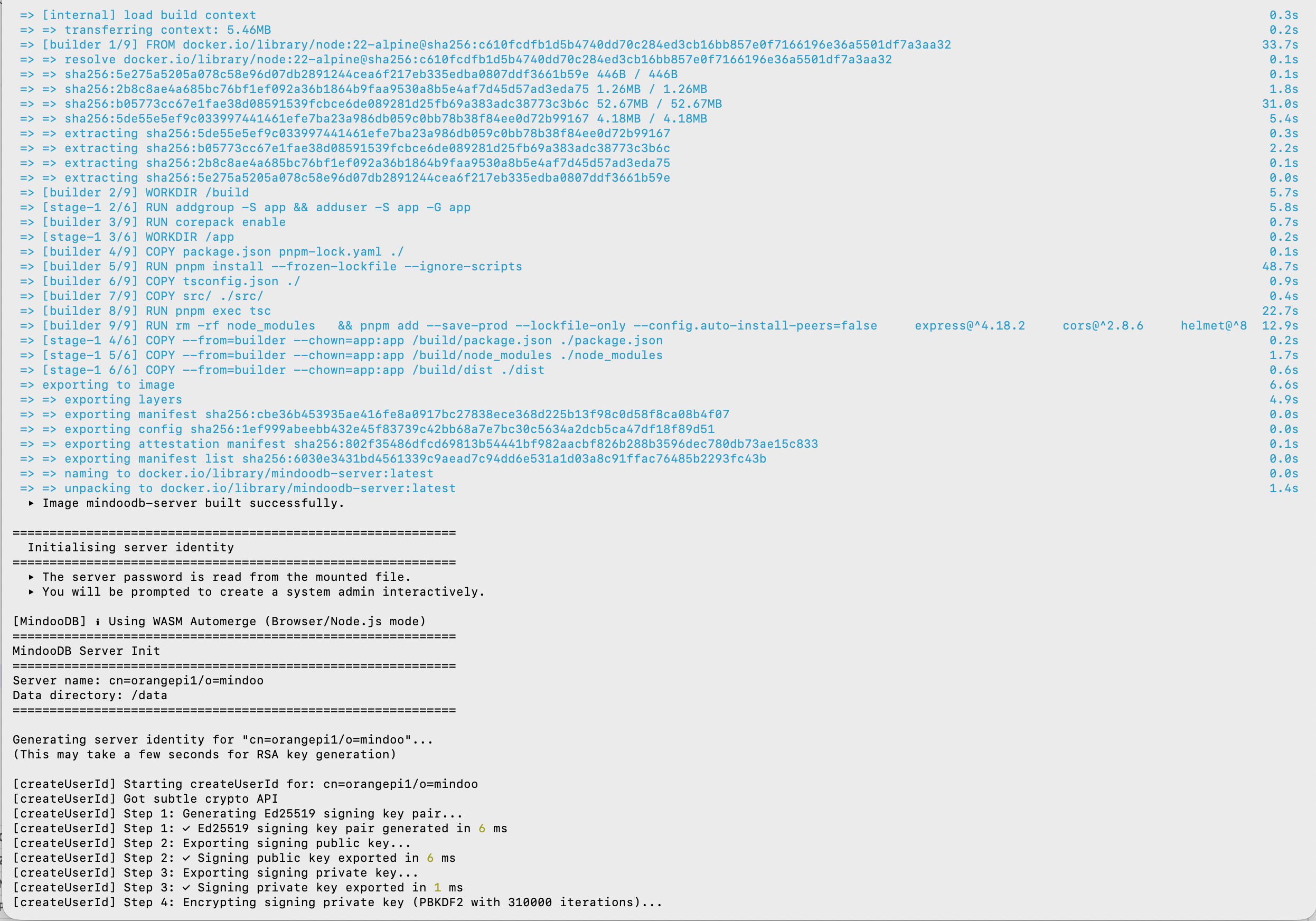
| Step | iPhone, emulated x86_64 | Orange Pi Zero 3W, native ARM64 |
|---|---|---|
| Docker image build, 19 steps | 4539.4 s (1 h 15 min) | 137.6 s |
pnpm install --frozen-lockfile | 1328.7 s | 48.7 s |
| TypeScript compile | 2183.5 s | 22.7 s |
| Ed25519 signing keypair | 277 ms | 6 ms |
| RSA-3072 encryption keypair | 46,477 ms | 377 ms |
| Server identity, total | 101,863 ms | 649 ms |
The TypeScript compile is the one to look at: 36 minutes against 23 seconds, a factor of about ninety-six. None of which says anything bad about the phone - it says what it costs to interpret x86_64 instructions one at a time on a CPU that speaks something else. The Orange Pi is simply running ARM64 code on an ARM64 processor, the way everyone intended.
An identity in 649 milliseconds
Generating a server identity is the most cryptographically expensive thing the setup does, and on the phone it was the part that hurt: 102 seconds, 46 of them spent on a single RSA-3072 keypair.
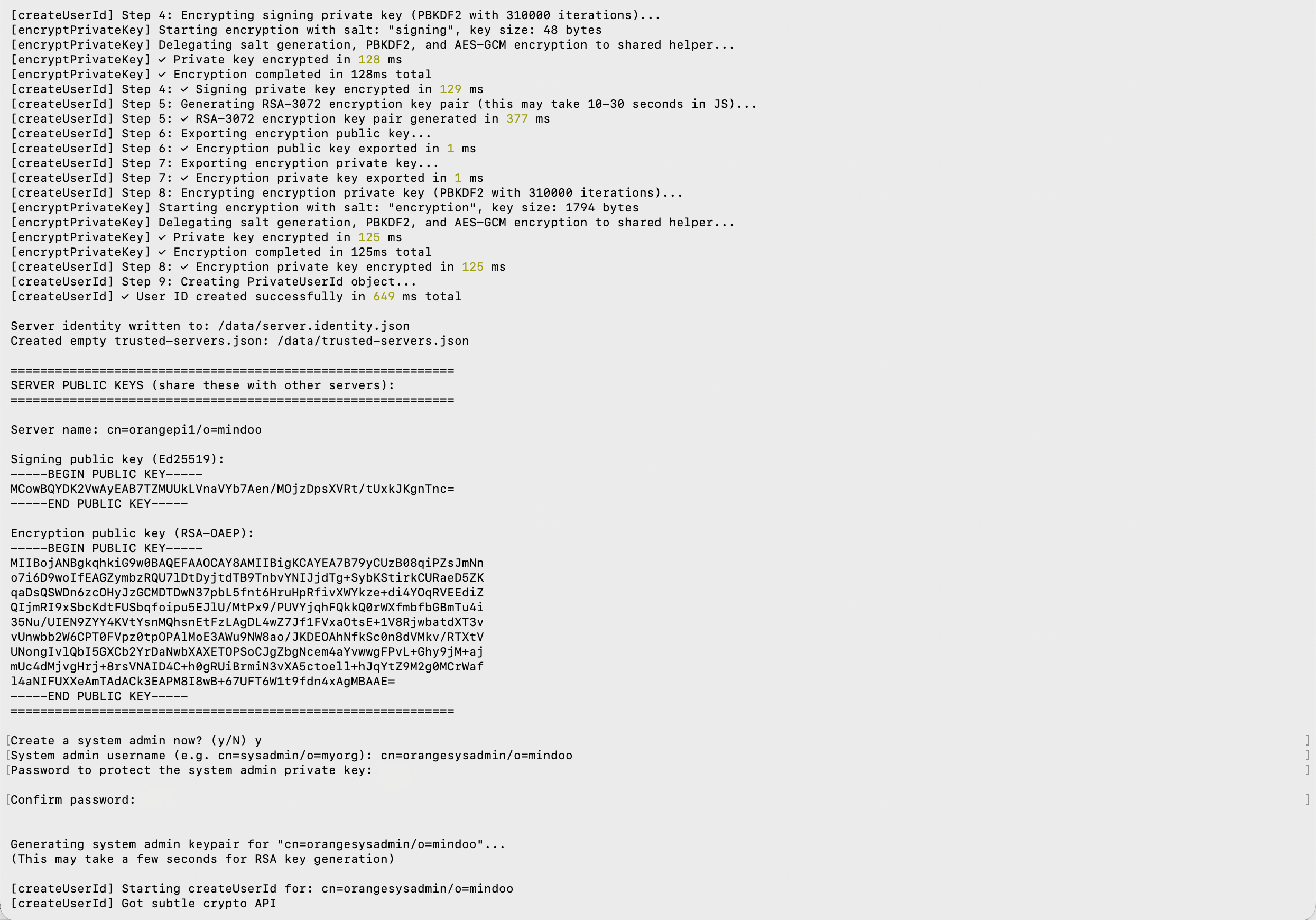
649 milliseconds, all in. The Ed25519 signing keypair in 6 ms, the RSA-3072 encryption keypair in 377 ms, and the two PBKDF2 passes - 310,000 iterations each, deliberately expensive so that a stolen identity file is not worth attacking - at 128 and 125 ms. That is laptop territory, from a board you could post in an envelope.
The setup then offers to create a system administrator, which is a second identity and therefore a second round of the same work. RSA key generation is a hunt for large primes and how long it takes is partly luck, so this one came in at 1033 ms rather than 649.
A system administrator is the superuser of the server, not of anybody’s data - it still holds no key that decrypts anything. Its job is the handful of /system/* routes: creating and removing tenants, changing the server configuration, wiring up sync to other servers. Which of those routes a caller may use is decided by a capability list in config.json, matched per HTTP method and path against the caller’s username and signing key, so “may create tenants whose name starts with demo_” is as easy to express as “may do anything”.
The default is that only the system administrator may create a tenant. On this board I did what our public demo server does instead, and used the open variant: one rule granting the wildcard principal { "username": "*", "publicsignkey": "*" } on POST:/system/tenants/*, so anyone may publish a tenant to it. That wildcard is deliberately narrow - it unlocks tenant creation and nothing else, not listing tenants and not editing the config - but it exists for demo and test machines, and it is not what you want on a production server. Both variants are written out in the server README.
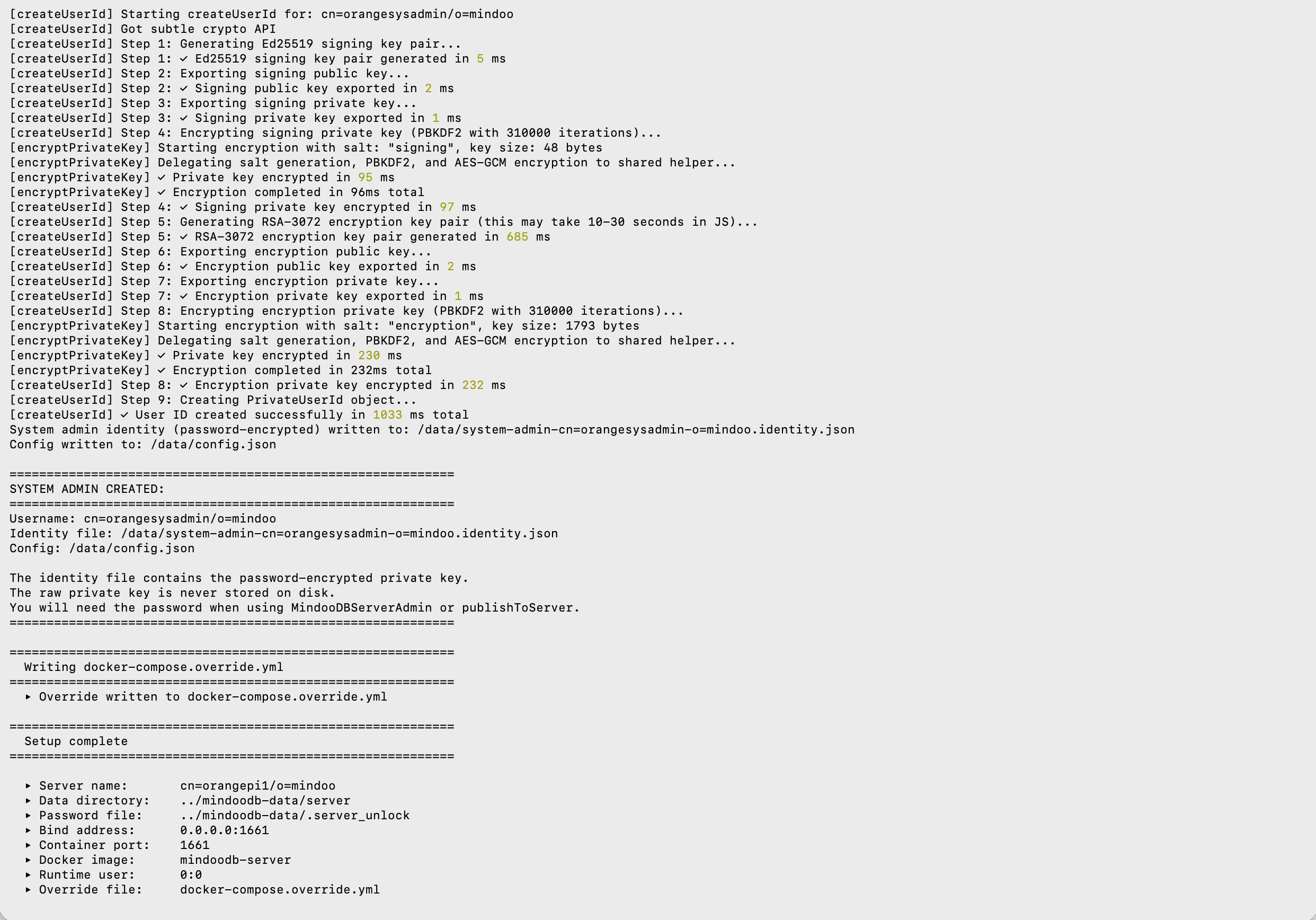
Worth saying out loud, because it is the least dramatic sentence in this article: nobody had ever run the MindooDB server on ARM64 before. Not as a supported configuration, not as an experiment, not once. There was no porting work, no failed first attempt, nothing to debug.
The reason is in the very first line the server prints, before it has done anything at all: Using WASM Automerge (Browser/Node.js mode). The part of the stack most likely to need an architecture-specific build - and therefore most likely to be the thing that breaks on an unfamiliar CPU - is the CRDT engine that merges concurrent edits, which is written in Rust. On Node.js it is loaded as WebAssembly rather than as a compiled native module, and WebAssembly is portable bytecode: the same artefact that runs on a laptop runs here. Everything above it is JavaScript in a Node.js container. There is nothing in the whole stack that knows or cares what an A733 is.
Listening on port 1661
docker compose up -d, then the logs.
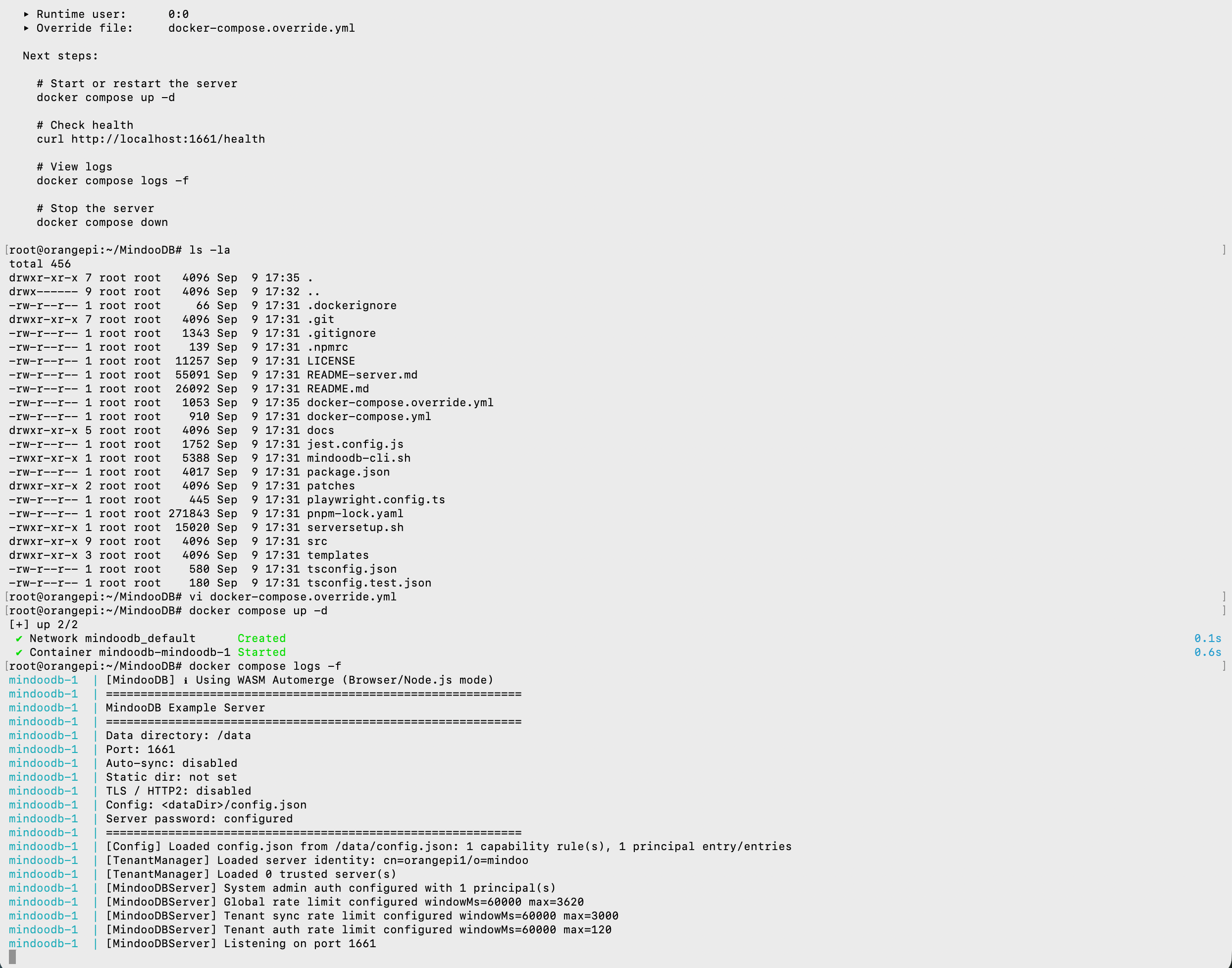
Server identity loaded, one system-admin principal, rate limits in place, zero trusted servers because this one has no peers yet, listening on 1661. A complete MindooDB server, on a board that has been powered by a phone charger this whole time.
Handing it a tenant
The rest happens in the browser. I opened Haven at haven.mindoodb.com - the live, hosted one, not a local build - went to Preferences → Tenants and pressed Push to server.
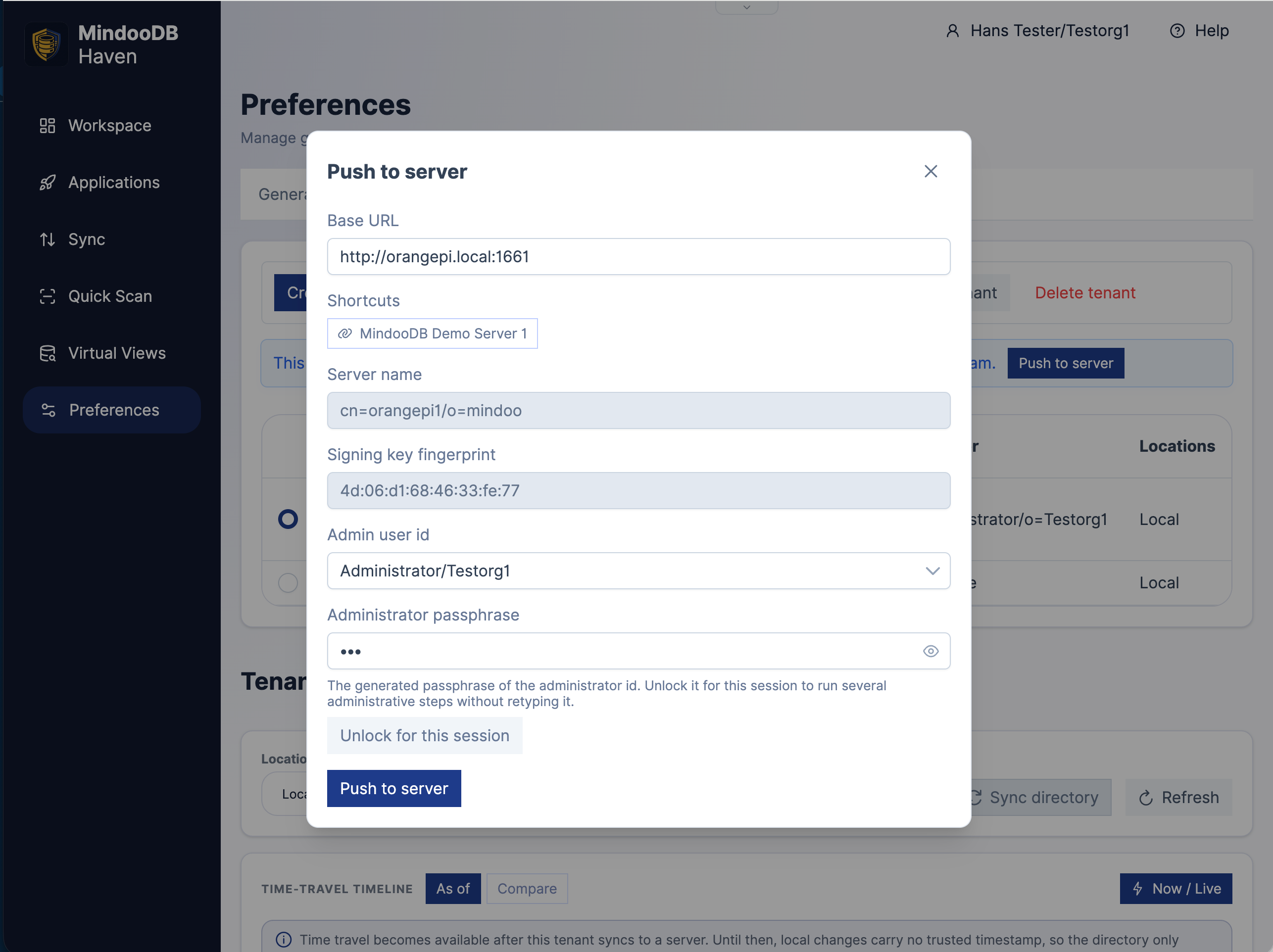
The only thing I typed was http://orangepi.local:1661 - the mDNS name Avahi is publishing on my LAN. Haven fetched the server’s public identity from it, showed me the name it claims to be and the fingerprint of its signing key to check, and after the administrator passphrase it registered the tenant. The administrator it asks for there is the tenant’s own - Administrator/Testorg1 - and not the server’s, which is precisely what the open tenant-creation rule above buys you.
The fingerprint is worth pausing on, because publishing the tenant writes this server into its trusted-witness list. From then on the server stamps each arriving entry with the time it accepted it and signs that receipt, and every other device checks the signature against that key before believing the timestamp. It is what stops somebody with a backdated laptop clock from slipping a change past a rule that had already been withdrawn.
The witness key is not the root of trust, though - and the root of trust never goes near the server. That is the tenant administrator’s signing key. Everything in the directory database is signed with it: the access control policies and rules, the groups, the grants that make a particular device part of a particular person’s account, and the Haven policies that install apps and set up the Sync page on a new joiner’s machine. Every client verifies those signatures itself before acting on any of it, so a rule or a policy that does not carry the administrator’s signature is ignored, no matter which server handed it over. The trusted-witness list is itself one of those admin-signed entries - which is why registering a server is an act of tenant administration, and not something a server can arrange for itself.
Then the Sync page, and several thousand encrypted entries going up the stairs over Wi-Fi.
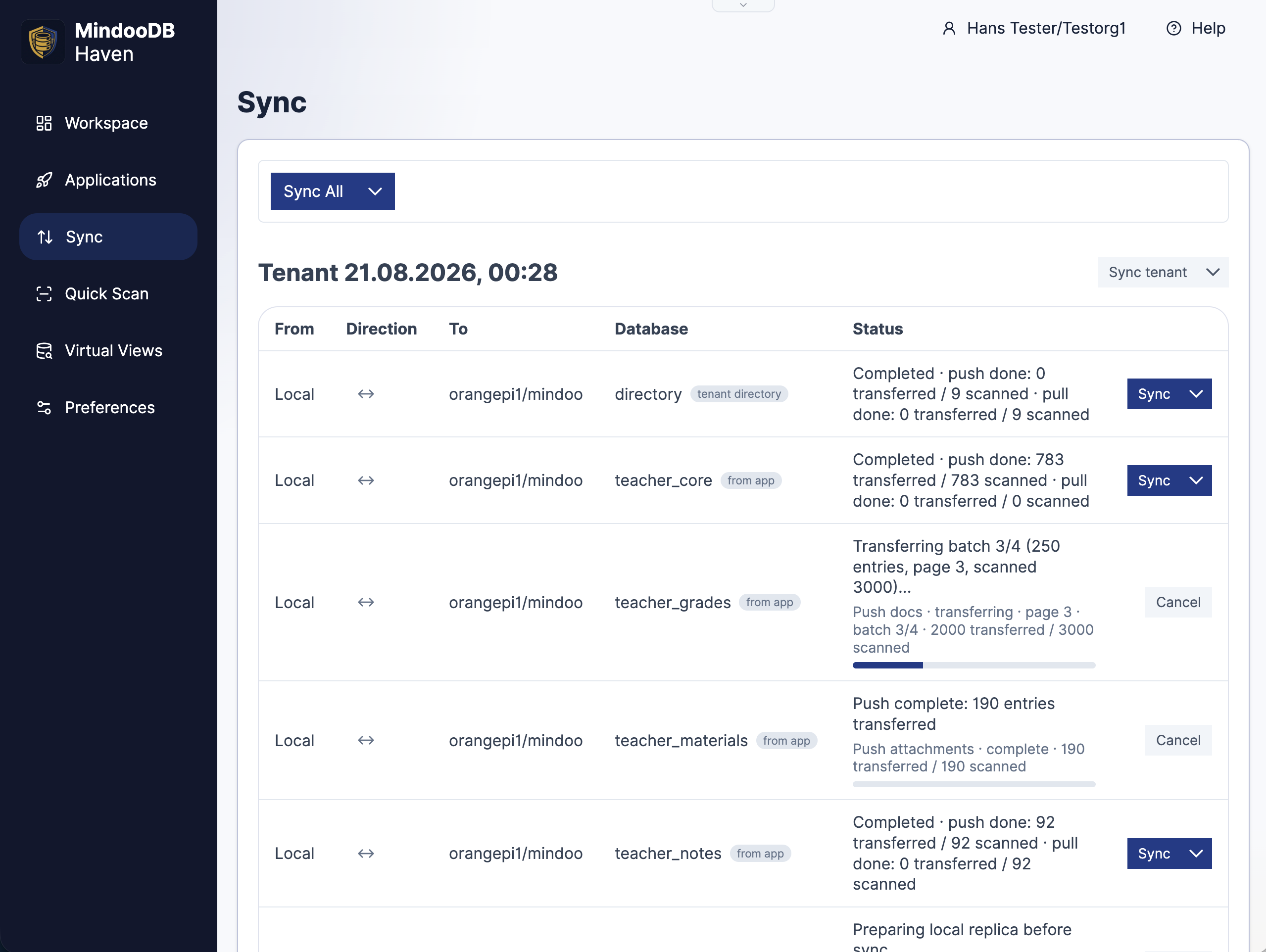
The tenant I picked was a Mindoo Teacher’s Desk demo data set, which is convenient because it is not small: the tenant directory, then a class and course database at 783 entries, a grades database of 3000 going up in batches, 190 attachments, and the lesson notes behind them. Everything in those progress bars is ciphertext. The Orange Pi is storing it, indexing the envelopes, chaining the history and stamping each entry with a signed witness receipt - and it cannot read a single word of any of it.
One client, several servers
The row above is one of several. A Haven client is not tied to a single server, and the Sync page lists a row per database per server, each with its own direction and its own schedule.
That is more useful than it sounds. The same tenant can sync with a server standing in the room and with a backup in a hosted environment - the near one for speed and for working when the uplink is not there, the far one so that a fire in the building is an inconvenience rather than an ending. Neither of them can read anything, so “which one holds my data” stops being a question about trust and becomes a question about latency and physics.
Which is where the small, self-contained server earns its keep. Put one on a ship, an oil platform, a research station - or, if you insist, the ISS - and the people there work against it at LAN speed, indifferent to whether the satellite link is up. When a connection does come back, that server reconciles with the one on the mainland. Being cut off is not a degraded mode; the island is just a node that has been offline for a while, which is exactly what MindooDB already assumes about your laptop on a train.
And servers do not only talk to clients. Server-to-server sync is part of the protocol: two servers exchange public keys, each records the other in its trusted-servers list, and from then on they mirror tenants on a schedule you configure - relaying encrypted entries without ever decrypting them, exactly as they do for clients. Data centres in two countries for disaster recovery, an edge node in front of an origin, a mesh with no single point of failure: all the same protocol, all a deployment decision rather than a code change.
Where your server lives
$85 and 14 grams buys eight ARM64 cores that build the entire MindooDB server in a little over two minutes and mint a cryptographic identity in two thirds of a second. It draws five volts, needs no rack and no contract, and its entire cooling system is a finned heatsink and a fan the size of a coin. As a demonstration of how little a MindooDB server actually needs, that is the end of the argument.
It is not an argument that you should go and operate one. Running a server is real work - patching, disks, monitoring, backups, the call at three in the morning - and for most teams it is not the work they are in business to do. MindooDB Cloud is the same server, run by us: a managed home that syncs every Haven app, with 200 GB per user and more on request. The details are on the pricing page. Self-hosting stays free and open source either way.
What makes that a genuine choice rather than a compromise is the encryption. “Where is our data?” has become a board-level question, and the usual answer is to own the hardware, because whoever runs the machine can normally read what is on it. Here they cannot: the server holds ciphertext and public keys, and the keys never leave your devices. Digital sovereignty - your data under your control, in a jurisdiction you chose - holds whether the box is in your cupboard, in our data centre, or both at once.
So where the machine lives comes back down to practical things: latency, whether the uplink is reliable, whether a regulator wants to see the rack, whether the site is a ship. And when the answer is “in the building”, this is what that now costs - a computer that fits in a drawer of the cupboard.
The next unlikely machine is already on the list. If you have a favourite candidate - the more awkward, the better - I would genuinely like to hear about it.
MindooDB is open source under the Apache 2.0 licence, and Haven Community is free for private and commercial projects at haven.mindoodb.com. Everything else is at mindoodb.com.