Karsten Lehmann 22 September 2026 15:00:00
The MindooDB on crazy hardware series has been enjoying itself. Part one ran a server inside an emulated x86_64 Debian VM on an iPhone 17. Part two put one on an Orange Pi Zero 3W - 14 grams, eight ARM64 cores, $85. Part three put one inside a GL.iNet Flint 2 Wi-Fi router, which is to say inside a box that was already in the room doing another job.
The point of all three was the same: a MindooDB server relays ciphertext it cannot read, so the hardware bar is low enough that “in that cupboard downstairs” is a real answer to “where is our data?”.
Except that every one of those articles quietly ended at the same place. The server came up, Haven pushed a tenant to it, several thousand encrypted entries went across - and the address I typed was http://192.168.8.1:1661 or http://orangepi.local:1661. A LAN address. Which is wonderful while you are standing in the building, and useless the moment you are not.
That is the gap this article closes. And closing it handed us a second feature we had been keeping a place open for since the original architecture: Haven clients that sync directly with each other, with no server in the middle at all.
The unglamorous problem
The machines people actually want to run this on are not in data centres. They are in a doctor’s practice, a two-partner law firm, a school office, or somebody’s utility room. And a residential or small-business internet connection is one of the least hospitable places on the internet to put a server.
The address changes. You need a dynamic DNS service to keep a name pointed at it, and then you need a port forward on the router, which somebody has to configure and which the next firmware update or the next router may or may not preserve. If the provider has put you behind carrier-grade NAT - increasingly normal - there is no port to forward at all, because you do not have a public address to forward it from. Then you need a TLS certificate for a hostname you only half control, and a renewal process for it, on a machine whose whole appeal was that nobody has to look after it.
None of that is hard, exactly. It is just a pile of small, unrewarding, permanent work stacked in front of a product decision, and for most of the organisations we talk to it is the difference between self-hosting and not bothering.
We could have built a tunnel service. We did not want to: the entire argument for a server in the cupboard collapses if reaching it requires a hosted component operated by us.
Berlin, July 2026
In July I went to Local First Conf in Berlin. Among the talks was one by Brendan O’Brien, CEO of number 0, about their product Iroh - and by the end of it I had stopped wondering what we would have to build, and started wondering how soon we could use what they had already built.
It is well worth 25 minutes if this problem is yours too:
Local First Conf 2026 - Iroh, by Brendan O’Brien (number 0)
Iroh is a peer-to-peer networking protocol and a Rust library. The core idea is that an endpoint is identified by a public key rather than by a DNS name or an IP address. Two endpoints establish a QUIC connection to each other: they try to hole-punch a direct path first, and when NAT or a corporate firewall refuses, traffic falls back through relay servers that forward packets without holding any key. Address changes are handled by the network rather than by you - an endpoint publishes its current relay and addresses under its own id and other endpoints resolve it back.
So: no DNS, no port forward, no certificate, no static address, and no fixed dependency on infrastructure we operate.
And then the part that made this more than a server-side feature. Rust compiles to WebAssembly, and WebAssembly runs in an ordinary browser tab. Whatever we did on the server, we could do in Haven too.
The server side: one flag in config.json
The MindooDB server now has an optional Iroh listener. It is off by default - a server that has a perfectly good HTTPS origin should keep using it, and joining a peer network is not something that should happen to you silently because you upgraded.
The Docker image already ships the native @number0/iroh package, so there is nothing to install on the host. Enabling it is a block in the server’s config.json and a restart:
{
  "capabilities": {
    "ALL:/system/*": [
      {
        "username": "cn=sysadmin/o=myorg",
        "publicsignkey": "-----BEGIN PUBLIC KEY-----\n...\n-----END PUBLIC KEY-----"
      }
    ]
  },
  "iroh": {
    "enabled": true,
    "secretKeyPath": "iroh-secret.key"
  }
}
serversetup.sh --update deliberately never rewrites an existing config.json, so on an already-deployed server this is a manual, visible edit. The secret key is generated in the data directory on first start and is the server’s long-term Iroh identity - back it up with everything else in there, because replacing it changes the endpoint id and every client holding the old one has to be repointed.
Here is our demo server starting with it switched on:
[MindooDB] ℹ Using WASM Automerge (Browser/Node.js mode)
============================================================
MindooDB Example Server
============================================================
Data directory: /data
Port: 1661
Auto-sync: disabled
Static dir: not set
TLS / HTTP2: disabled
Config: <dataDir>/config.json
Server password: configured
============================================================
[Config] Loaded config.json from /data/config.json: 2 capability rule(s), 2 principal entry/entries
[TenantManager] Loaded server identity: CN=cn=demo1/o=mindoo
[TenantManager] Loaded 0 trusted server(s)
[MindooDBServer] System admin auth configured with 2 principal(s)
[MindooDBServer] trust proxy set to 1
[MindooDBServer] Global rate limit configured windowMs=60000 max=3620
[MindooDBServer] Tenant sync rate limit configured windowMs=60000 max=3000
[MindooDBServer] Tenant auth rate limit configured windowMs=60000 max=120
[MindooDBServer] Listening on 0.0.0.0:1661
[Iroh] Listening on ALPN mindoodb/sync-v5
[Iroh] Endpoint id: 1b5fb57653d25ae7b0ef8a30fe8b3f4bf9b60283cc3afe1d38f0ff9a8412dc0b
[Iroh] Ticket: endpointaanv7nlwkpjfvz5q56fdb7ulh5f7tnqcqpgdv7q5hdyp7guecloawayaenuhi5dqom5c6l3fovrtcljrfzzgk3dbpexg4mbonfzg62bonruw42zof4aqalxbs5x6thicaeakyeqaaluz2aq
The last three lines are the whole feature. The server is still listening on 0.0.0.0:1661 for anything on the LAN - the Iroh listener is additional, not a replacement - and it has joined the peer network under the application protocol mindoodb/sync-v5, waited until it had a home relay, and printed a ticket.
That ticket, prefixed with iroh:, is what you type into Haven. It goes into the same Base URL field of the Push to server dialog that took http://192.168.8.1:1661 in the router article, and into Add existing location and Join tenant as well. The raw endpoint… string without the prefix works too. The one value that does not work as a first pairing is the bare endpoint id on the line above it: iroh:<64-hex> is the stable label Haven keeps internally, but a first dial needs the full ticket, because that is what carries the current relay and socket addresses. If a stored connection stops working after the server changed IP or relay, copy a fresh ticket out of the log.
There is now a chapter in the server README covering exactly this: what it is for, that it is off by default, how to turn it on, and which value to paste where.
Two things worth being explicit about, because “peer-to-peer” invites the wrong assumption. Iroh replaces the address, not the security. A client still signs a challenge, still gets a JWT, and the capability rules in config.json still decide who may call which /system/* route - a ticket is not a credential and not a secret. And the protocol above the transport is unchanged: the same sync RPCs, the same encrypted entries, the same access rules. Iroh is an alternative NetworkTransport, which is why enabling it needed no changes anywhere else in the stack.
Server-to-server mirroring gets it for free, incidentally. Put iroh:<ticket> in trusted-servers.json as a peer’s url and two servers mirror each other over QUIC instead of HTTPS - which means the small isolated server on the ship, the oil platform or the practice can reconcile with the one in the data centre without either of them having a public URL.
And then: why stop at the server?
Having an Iroh runtime in the browser for the sake of one URL field felt like a waste.
Because the interesting thing is what the transport is talking to. On the server side it reaches a MindooDBServer. But MindooDB’s sync methods - pullChangesFrom() and pushChangesTo() - take any ContentAddressedStore. The other end does not have to be a server. It can be another device’s local store.
This is not a new thought for us. Peer-to-peer has been in the architecture since the original design, and for three reasons that all point the same way:
- Append-only storage. Every change is an immutable, content-addressed, cryptographically chained entry. Merging two replicas is set union plus CRDT convergence, not conflict resolution. Order does not matter, duplicates deduplicate by content hash, and no participant needs to be the authority.
- End-to-end encryption with the keys on the devices. Payloads are encrypted before they reach any store. The sync layer reads only metadata - entry id, content hash, timestamps, signatures - to work out what the other side is missing. It never needs plaintext, which is precisely why it does not care who is moving the bytes.
- A distributed permission system. Access rules live in the tenant’s
directory, signed by the tenant administrator, and every client verifies those signatures itself before acting on them. Permissions do not live in a server, so they do not disappear when the server does.
Separating the transport from the encryption is what makes the scenarios interesting rather than merely possible. A peer, exactly like a MindooDB server, can relay data between two other peers without being able to read it. Two people can work on a document directly between their devices, with nobody else noticing, and push the finished result - including the complete edit history, entry by entry - to the server later. And if the server is down, or the uplink is out, or someone unplugged the cupboard, the peers simply carry on with each other and reconcile with the server whenever it returns.
So Haven now does peer sync as well.
Announcing a device, and accepting one
The hard part of peer-to-peer is never the sync. It is discovery: how does one device learn the other’s endpoint id, over a channel that works before the connection exists?
Haven solves it with the tenant it already has. On first start each device generates and persists its own Iroh secret, derives its endpoint id from it, and publishes that id into the tenant’s userdirectory database as a small document - one per device, keyed by the fingerprint of the device’s signing key, so a reload updates the record rather than accumulating a new one. The record is encrypted with the tenant’s default key: every member of the tenant can read it, and the server hosting it cannot, because who syncs with whom is not the hoster’s business.
A record is only a claim until it is verified, and Haven checks three things before believing one: that the document id really is the fingerprint of the signing key in the payload, that the entry creating it was signed by exactly that key, and that the key is an active, non-revoked grant in the directory. Anything that fails is dropped silently - an unverifiable device record is the expected shape of an attack, not an error worth a dialog.
The allowlist for incoming connections is built from precisely those verified records. This is server-assisted discovery for a serverless sync, and we are comfortable with that trade: the tenant directory has to have travelled at least once before two devices can find each other, which is why Haven only offers peer sync for tenants that already live on a server.
Announcing and accepting are deliberately separate. Publishing your endpoint happens whenever your identity is unlocked, so other devices can find you. Whether you answer is a second, off-by-default decision, in Preferences:
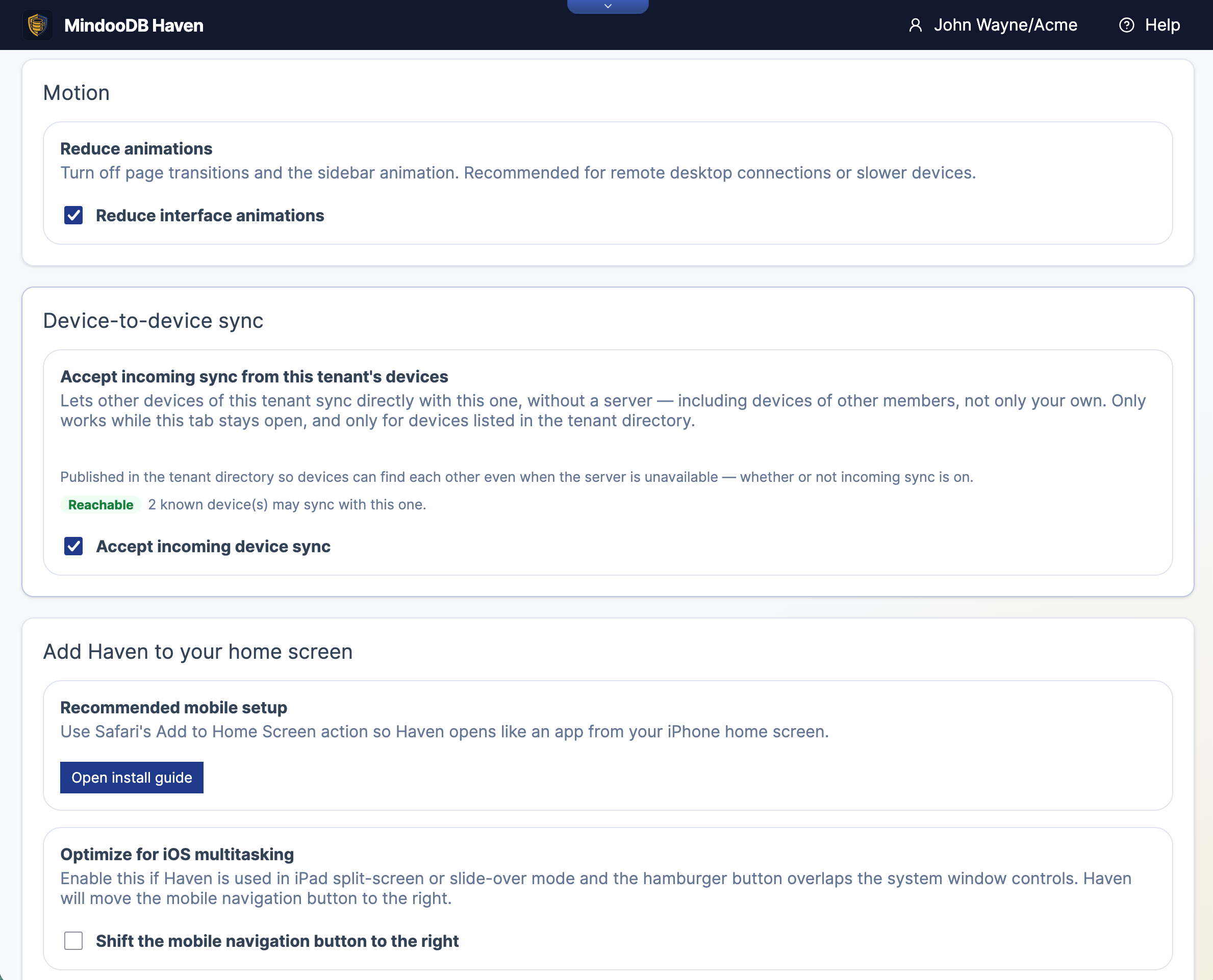
The description in that card is the honest summary of what the feature is, so it is worth reading rather than skipping: other devices of this tenant - not only your own, but any member’s, which is what makes it collaboration rather than just device roaming - only while this tab stays open, and only for devices listed in the tenant directory.
The Reachable badge means the listener is bound and the allowlist is not empty. Before the directory has arrived it says Waiting instead, with the reason: sync the tenant once so its directory is there, and the other devices become recognisable.
Adding a peer as a sync location
On the Sync page, the tenant’s overflow menu has a new entry:
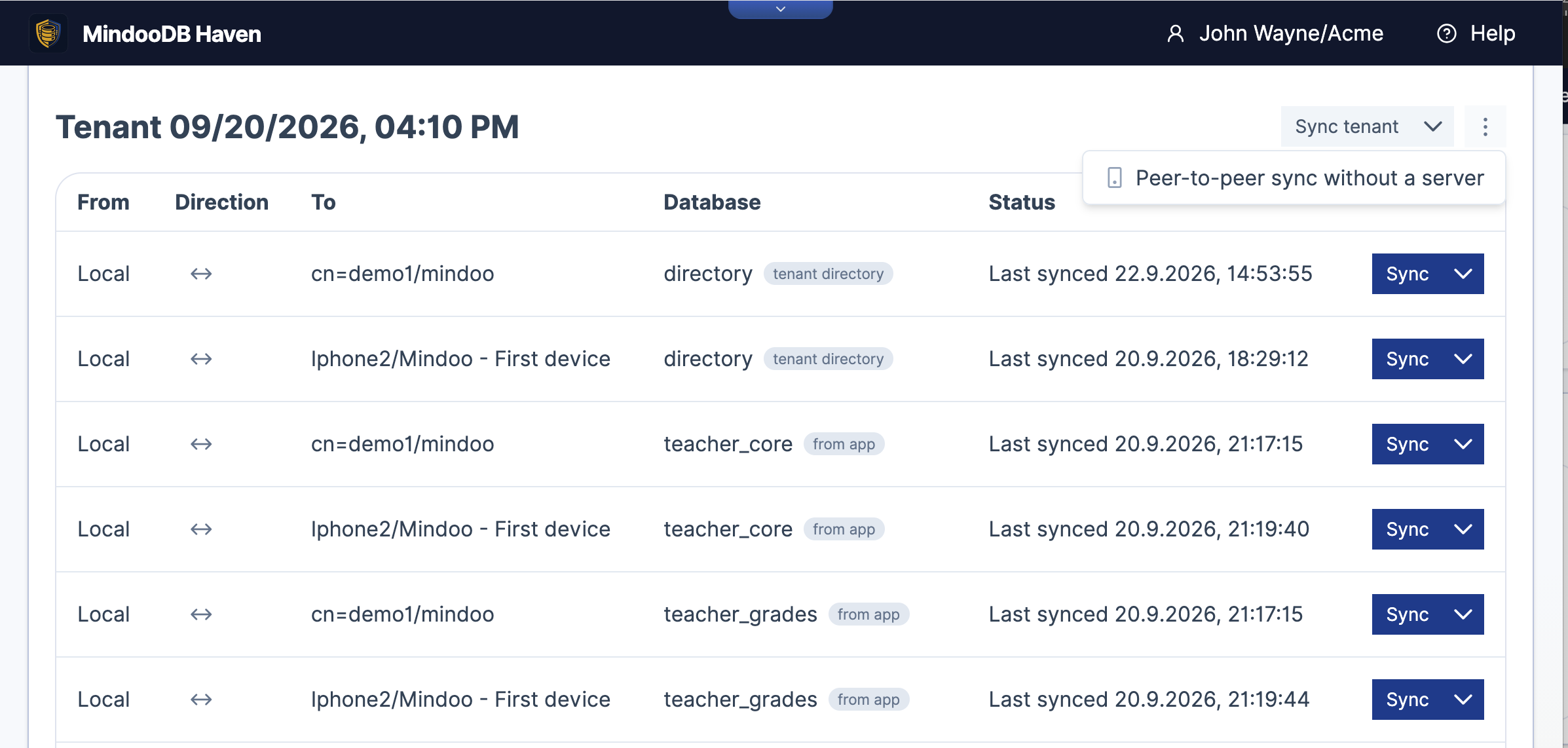
Look at what is already in that table, because it is the design decision that made this small to build. Haven has always listed a row per database per sync target, each with its own direction and schedule - that is how the same tenant can live on a server in the room and a server in a data centre at once. A peer device is simply another target in the same list. Local ↔ cn=demo1/mindoo is a server. Local ↔ Iphone2/Mindoo - First device is an iPhone.
Picking a new one opens the device list, built from those verified directory records:
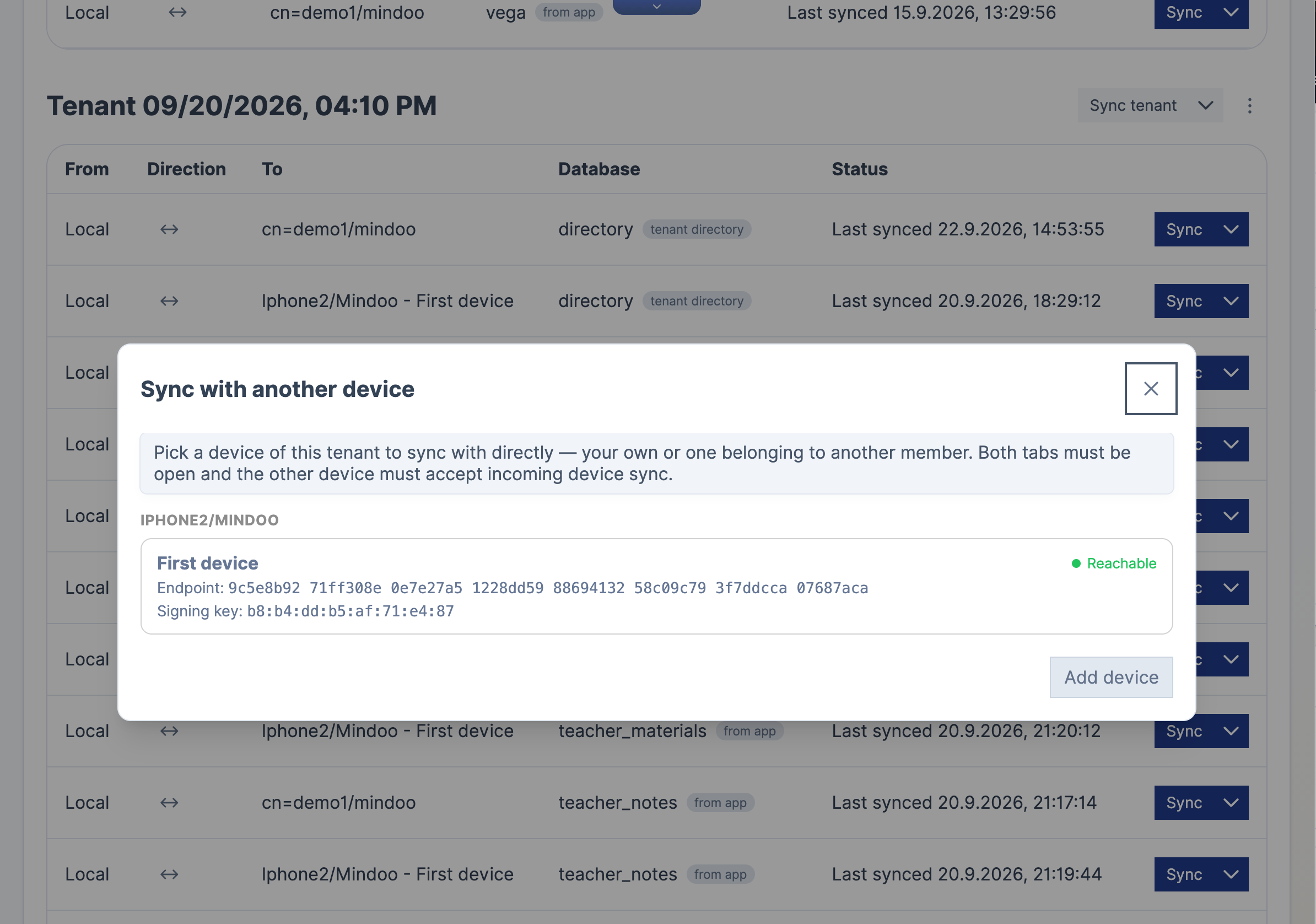
Devices are grouped by the member who owns them, and each one shows both its endpoint id and the fingerprint of its signing key - the value you can compare out of band if you want to be sure which physical device you are about to talk to. The Reachable badge here is not a guess: Haven has actually dialled the peer and asked for a store head. If it says Not reachable, the other tab is closed, or that device has incoming sync switched off, or it has not got your record yet.
Watching it from the other side
The receiving device gets its own panel, which has turned out to be the part of the whole feature I look at most:
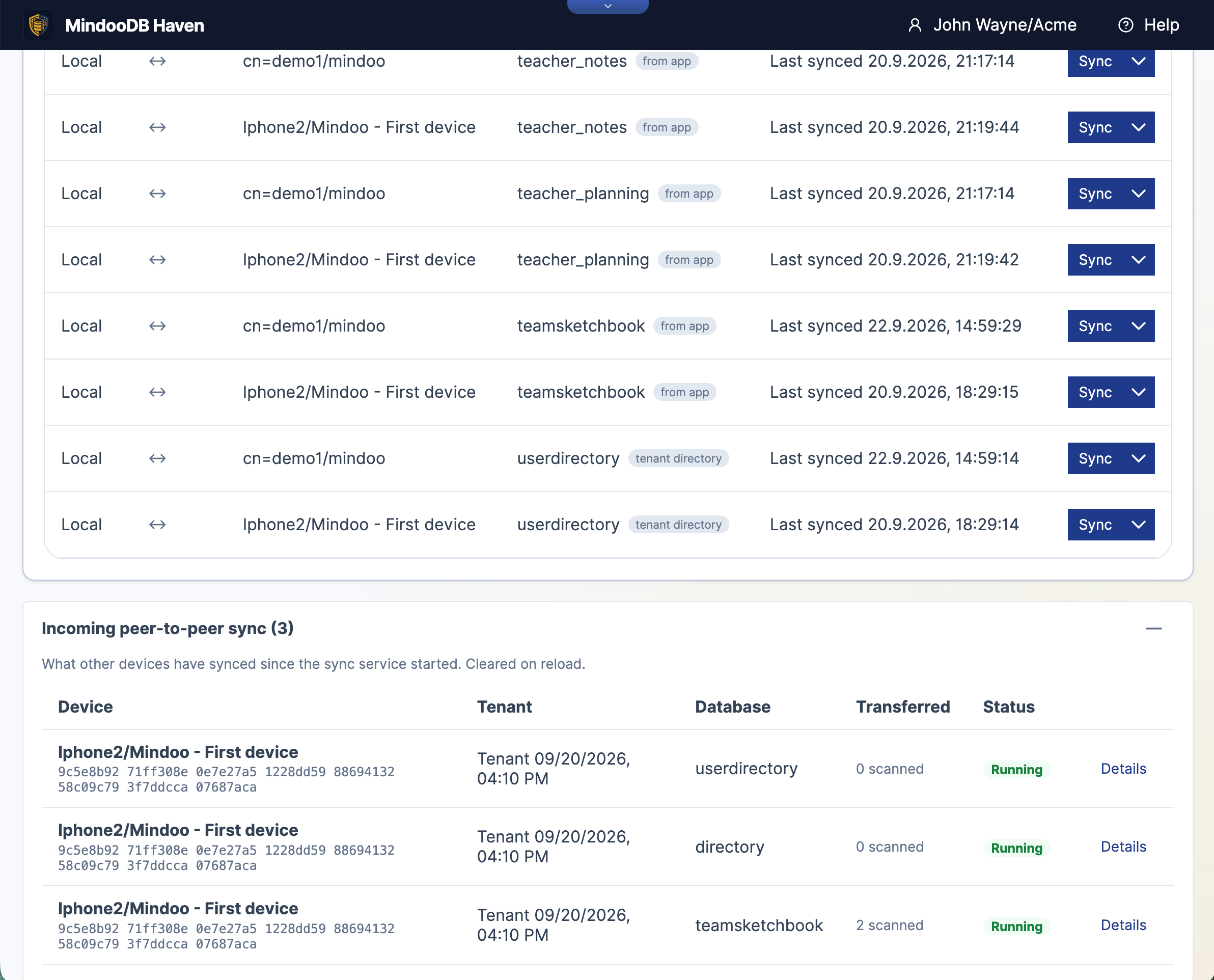
Three incoming sessions from an iPhone, one per database, each naming the endpoint that is calling. It is in-memory and cleared on reload, because it is not an audit log - it is a window into something that would otherwise be completely invisible. Somebody else’s device is reading from and writing to your browser’s storage, and you should be able to see it happening.
Details shows what it actually asked for:
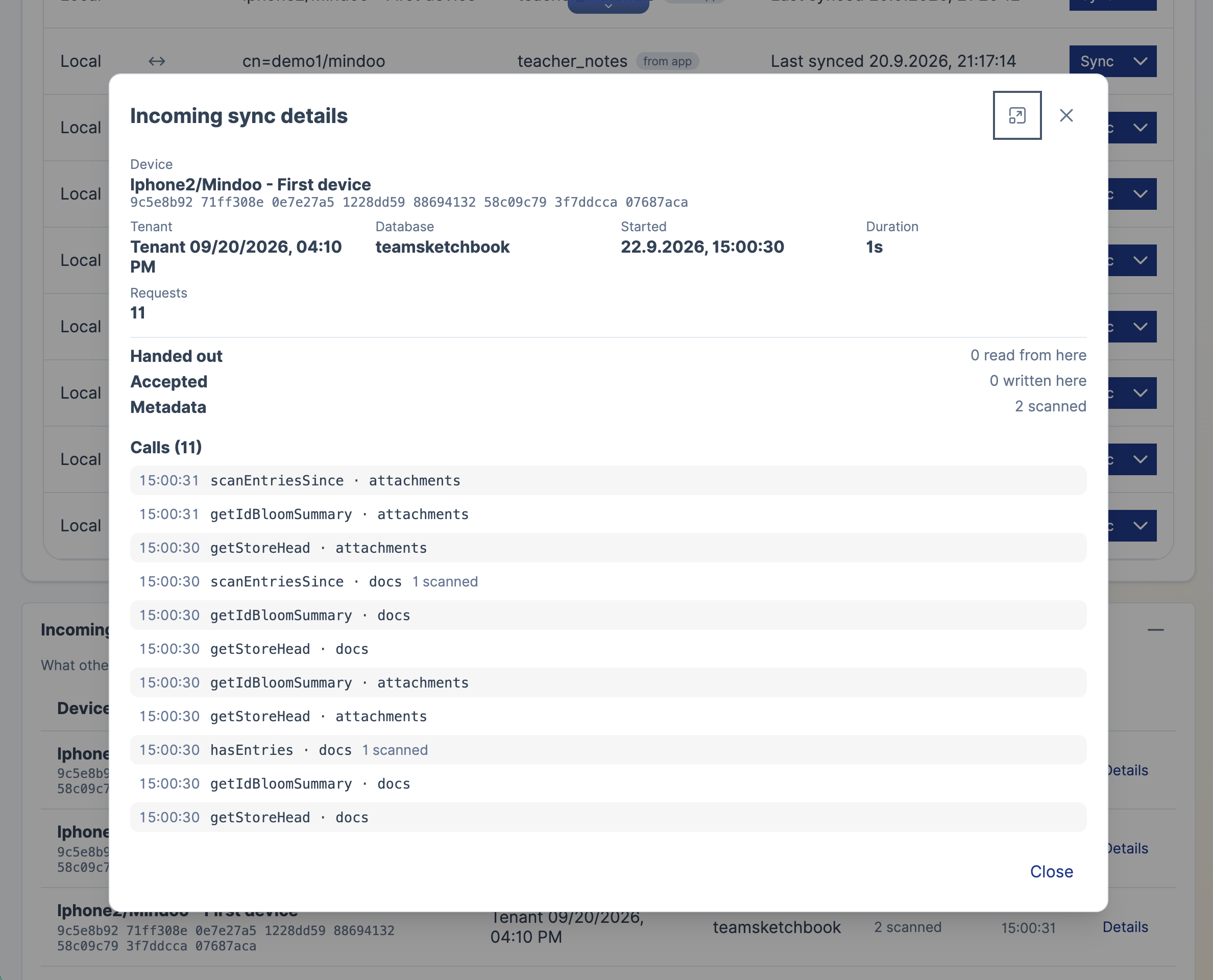
Those eleven calls are the ordinary MindooDB sync protocol: getStoreHead to find out where the other side is, getIdBloomSummary to pre-filter what it might be missing, scanEntriesSince to page through metadata, hasEntries to confirm. Exactly the RPCs a server answers, against two stores - docs and attachments - because attachment bytes live in a separate store and syncing only documents would leave them behind.
The counters are worth their own sentence. Handed out is how many entries left this browser. Accepted is how many were written into it. Metadata is how much was merely compared. In the run above, two pieces of metadata were scanned and nothing moved, because the two devices were already in step - which is what a healthy sync between converged replicas looks like.
What the listening device has to check
There is one genuinely subtle thing in here, and it is the reason peer sync took longer than “point the transport at a device” would suggest.
In normal MindooDB sync, the server is a witness. When it accepts an entry it stamps the time it arrived and signs that receipt, and it evaluates the identity tier of the access rules at that moment - who signed, which database, which operation - recording the verdict in the receipt. Every other device then trusts the receipt instead of deciding again. That is what keeps the system convergent: each entry reaches a replica through a witness.
A peer sync has no witness. Entries arrive with no receipt, and an entry without a receipt reads as a purely local write with nothing to check. So unless the listener evaluates those rules itself, nobody ever does - and a member whose write access to a database had been withdrawn would still be a member, still on the allowlist, still able to sign perfectly valid entries, and could route them onto your replica by going around the server. Signature verification does not catch that, because the signature is genuinely valid. It is the permission that is missing.
So before any incoming bytes are stored, Haven does what a server would have done: verifies each entry’s signature against a key the directory actually trusts, applies the built-in write invariants for directory and userdirectory, and evaluates the identity tier of the access rules itself - failing closed if the directory cannot produce a verdict, because a missing answer is not a yes. Only then are the bytes written, and only then materialised into documents.
Which is what makes peer sync a route around the server rather than around the rules. An entry taking this path is judged twice, independently: once by the device that accepts it, and again by the server, against the directory state the server holds at the moment the entry finally arrives there. Neither judgement takes the other’s word for it, and going device to device skips neither.
We wrote all of this down rather than leaving it in our own code, because anyone building peer sync on the MindooDB SDK has exactly the same duties: p2psync.md is the step-by-step guide, with the listener checks, the platform matrix, and a blunt list of what peer sync does not give you.
Limits, stated plainly
Being clear about these is more useful than being enthusiastic.
In a browser, every byte goes through a relay. This is structural, not a missing feature: a web page cannot open raw UDP sockets, so there is no hole punching to do. Native clients - a CLI, a service, React Native - attempt a direct path first and only fall back. The public relays run by n0 are free, shared and rate-limited with no SLA, which is fine for a handful of devices and not something to build a product on without reading their pricing first. Relays never see plaintext; they forward encrypted QUIC packets.
A browser tab is only a peer while it is open. There is no background listener, and there cannot be one. Peer sync is for devices that are both in use at the same time, which is exactly the situation it is meant for - two people in a meeting, a tablet and a laptop on the same desk, a colleague on the other end of a call.
The tenant has to have been on a server once. Discovery rides on the tenant directory, so a purely local tenant that has never synced anywhere has nothing to discover with.
Realtime works outbound, not inbound. The Sync page’s Auto-push changes switch fires a couple of seconds after a local write and pushes to every push-capable target for that database - and it does not care whether that target is a server or a device, so your own edits reach a listening peer about as soon as you make them. The incoming half has no peer equivalent. A server connection holds a live change feed open, as SSE over HTTP or as a dedicated stream with heartbeats over Iroh, so a device is told about changes it did not cause. Two peers keep no connection between sync runs, and subscribeToChanges is deliberately not among the methods a peer answers. Hearing about the other side’s edits therefore takes a sync run: theirs, or one you trigger.
A peer is not a server. It issues no tokens, hosts no tenants for anybody, joins no mesh, and is available only while its process runs.
And the server still has the last word. A peer accepting an entry is no promise that the server will. When those entries are eventually pushed, the server runs the whole examination again against its own directory state at the moment it accepts them - the same instant it stamps into the witness receipt. If the operation has been forbidden in the meantime, the push is refused with an access-denied error, and the entry stays on the device and is retried until that right is granted again or the entry is gone.
One last practical note: the Iroh WebAssembly bundle is about 2.1 MB, and Haven loads it on demand rather than baking it into the service worker precache. If you never paste an iroh: locator and never switch on device sync, you never download it.
What this adds up to
The crazy-hardware series was about how little machine a MindooDB server needs. This is about the other half of the same argument, which turns out to be the harder half: a server you cannot reach is not a server, and for most of the places where one of these boxes belongs, reachability was a stack of DynDNS, port forwards and certificate renewals that nobody signed up for.
Now it is a ticket. Enable a flag, copy a string out of the log, paste it into Haven. The box in the cupboard is reachable from anywhere, with no public address, no open port, no certificate and no hosted tunnel operated by us. The Flint 2 in part three did not become a better server; it became a reachable one, which is the property that was actually missing.
And the side effect turned out to be the more interesting feature. Because MindooDB separates moving encrypted bytes from understanding them, a device can do the server’s job without gaining the server’s privileges - so two Haven clients can now converge directly, work together while the server is down, keep a piece of work between themselves until it is ready, and hand over the complete signed history when it is. That was in the architecture from the beginning. It just needed a transport that could get from one browser tab to another.
Which, pleasingly, is a thing a talk in Berlin in July turned out to have already built.
MindooDB is open source under the Apache 2.0 licence, and Haven Community is free for private and commercial projects at haven.mindoodb.com. Everything else is at mindoodb.com.