Karsten Lehmann 11 July 2026 15:07:00
This is the last post in the summer catch-up, and it is about the parts you don’t see - the platform work underneath everything else in this series. Three things: a better sync, live updates, and a way to recover your entire workspace from a piece of paper.
Sync that moves less and feels lighter
Sync is the heartbeat of a local-first system like Haven - it is how your devices, and your teammates’, quietly stay in agreement. We have reached the fifth version of our sync, and the theme of this round was doing the same job with less.
It now sends your data in a more compact form - compressed, and as raw data rather than the bulkier text-friendly encoding we used before - and it asks less of the server along the way. In plain terms: syncs use less of your bandwidth and mobile data, and a server can comfortably keep more people in sync at once. None of this changes what sync does; it just does it more efficiently, which matters most exactly when conditions are worst - a weak connection, a busy server, a big backlog after a while offline.
Collaboration that feels immediate
Two smaller changes add up to a much livelier feeling when people work together.
First, our servers can now tell your devices the moment new data arrives, instead of your device having to check back periodically. This uses a lightweight web standard called Server-Sent Events (SSE) - a one-way channel the server can use to nudge your device the instant something changes. When a colleague saves something, the news reaches you right away.
Second, the Sync page has a new option to push your own changes out the instant you make them. Turn it on for the tenants where you collaborate closely, and the round trip from “I typed something” to “my teammate sees it” gets about as short as it can be. Together these turn Haven from “everyone catches up eventually” into something that feels like real-time when you want it to - while still being perfectly happy to fall back to catch-up-later when you’re offline.
A look under the hood, when you want it
Most of the time sync should be invisible - it just happens. But sometimes you want to know exactly what went on, especially if something didn’t turn up where you expected it.
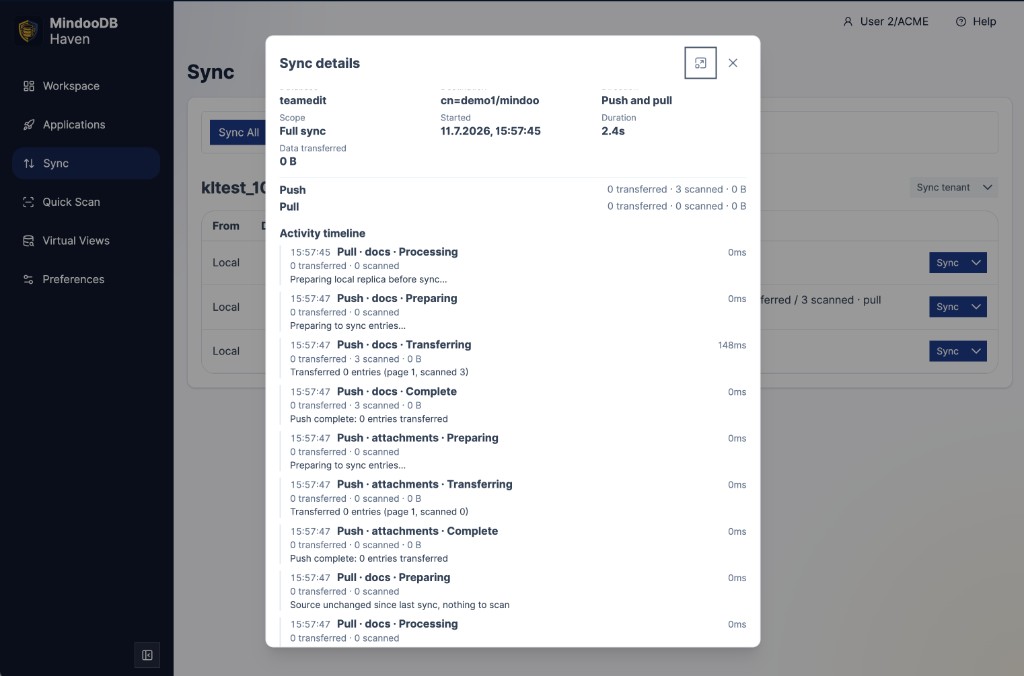
So the Sync page now has a sync details view. Open it and each sync reports what actually happened: how much data was transferred, how long each phase of the sync took, and - most useful of all - whether anything was rejected. If a change was turned away (for example because it broke one of the governance rules from the access-control post, or arrived in a form the server wouldn’t accept), you can see it here instead of being left to wonder why a document never appeared.
It is meant as a diagnostic window - normal users can happily ignore it, while anyone doing a technical analysis finally has the facts in front of them.
Recovering a whole workspace from paper
Now my favourite, because it is a little bit paranoid in the best way. :-)
Haven already has a full data backup. But backups have a bootstrapping problem: what if the disaster is total? Every device lost, and the backup file with them. What you really need to get going again is small - the identity of your users, the keys that unlock their data, and the settings that say which server to sync from. With just those, a fresh device can connect, sync, and pull everything back down from the server.
So, on the Backup page in Haven’s preferences, you can now generate a tenant recovery printout: a single document covered in QR codes that holds exactly that small, essential kernel. Print it, and keep it somewhere safe - a drawer, a folder, a safe.
Two touches make it genuinely robust:
- It survives damage. The codes are printed with redundancy, so you don’t need a perfect page. Even if the paper gets creased or a few codes are smudged, scanning a subset of them - say any sixteen out of twenty-two - is enough to reconstruct the whole thing. Paper folds; this plans for it.
- It is protected even if someone finds it. The codes are locked behind a security question, on top of the password protection your user identity already has. A stranger who picks up the sheet cannot simply scan it into access.
When you need it, you scan the codes on a new device, answer the security question, let it sync against your MindooDB server, and you are back up and running. It is the ultimate “break glass in case of emergency” - offline, in your own hands, and requiring no cooperation from anyone.
Deleted, but never truly gone
Here is a small feature that will make a lot of people smile: in MindooDB, you can now undelete a document.
It falls straight out of the way MindooDB works, and it is worth pausing on because it is the same idea behind almost everything in this series. MindooDB never overwrites and never erases - it only ever adds to an append-only history. So deleting a document isn’t really the destruction of anything; it is just one more entry that says “as of now, treat this as deleted.” The document’s whole past is still sitting safely in the history behind it.
Which means bringing it back is equally simple: undeleting is just another ordinary entry that says “actually, it’s here again.” Nothing is dug out of a bin or restored from a backup - the document simply steps back into view, with its full history intact. And because both deleting and undeleting are just normal changes, a document can go back and forth as many times as you like. A MindooDB document can, quite literally, rise from the dead - more than once.
It is a genuinely useful safety net for the everyday “oops, I didn’t mean to delete that” - but it is also a neat illustration of the whole philosophy: when your data lives in an honest, append-only history, “undo” isn’t a special feature bolted on the side. It is just the natural shape of the thing.
When you really do need it gone: purge
Of course, “nothing is ever erased” occasionally runs into the real world, where sometimes a document genuinely must disappear for good - most often for data-privacy reasons, when someone exercises their right to have their data deleted. For that we added a purge policy: a way to name a list of documents by their id and have them actually removed, not just marked deleted, from every device they have reached.
Because this is the one operation that truly destroys data - the deliberate exception to the append-only rule - it is deliberately hard to do by accident. A purge has to be signed with administrator rights in the directory database, so it is an authenticated, authorised instruction rather than something any user or the server operator could quietly trigger. Erasure stays possible when the law requires it, but only as a considered, accountable act.
And a long tail of small things
Alongside these there has been the usual steady stream of smaller improvements across Haven - the kind of polish that never gets its own headline but that you feel every day in how solid the app is to use.
That’s the summer
That wraps up the catch-up. If you started at the roundup, you have now seen the whole arc: governance for organisations, instant search over encrypted data, full-text search and scanning, the App Store, TeamSketchbook, Teacher’s Desk, and now the platform work that carries all of it.
MindooDB, the database underneath it all, is open source under the Apache 2.0 licence, and Haven Community is free to use for both private and commercial projects - try it at haven.mindoodb.com, and find everything else at mindoodb.com. Thanks for reading, and here’s to an equally busy autumn.